




Summary
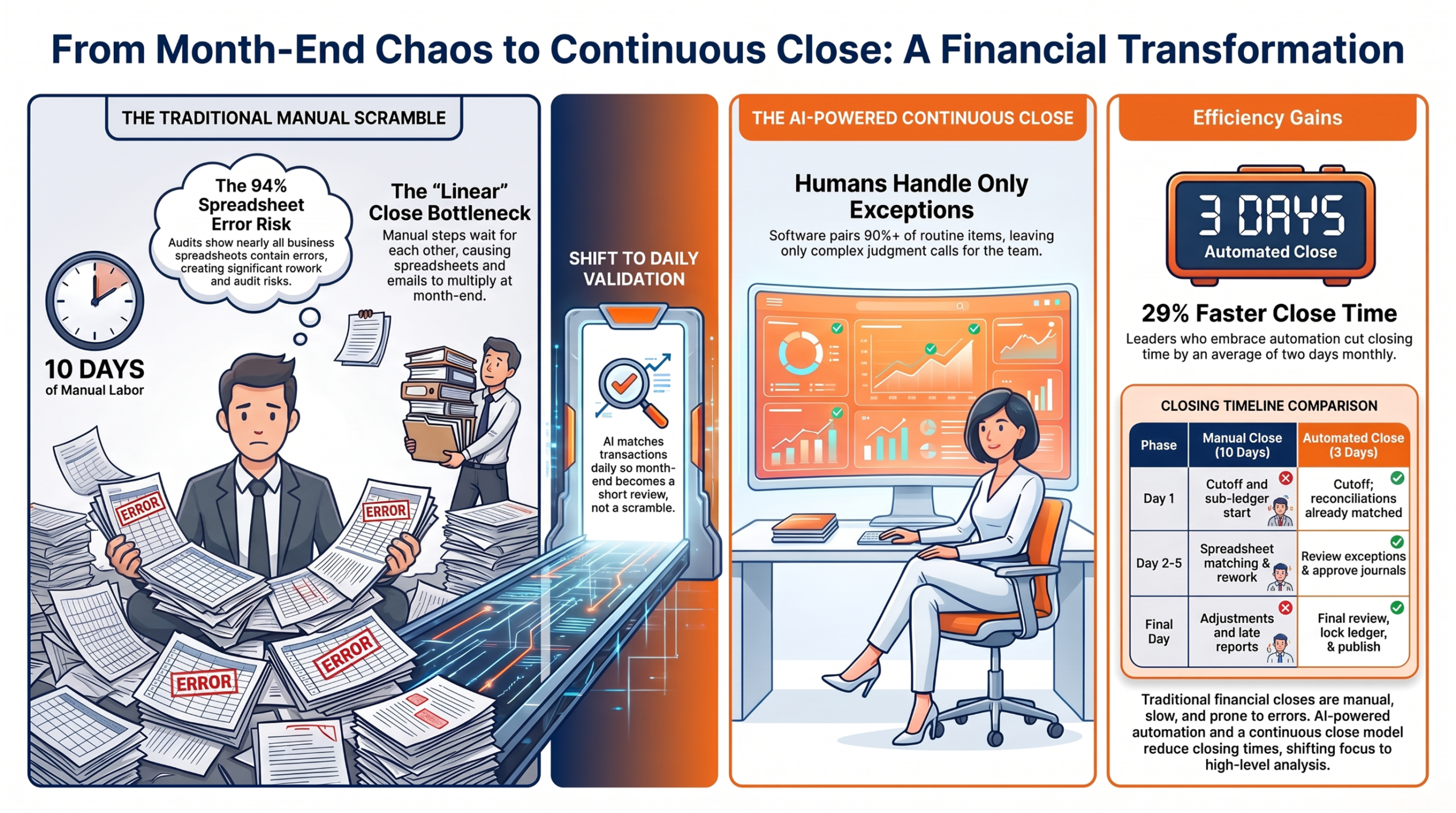
Financial close automation uses AI and workflow tools to replace repetitive, error-prone month-end tasks with continuous, controlled processes. Automating reconciliations, journal entries, anomaly detection, and task tracking can reduce close times, improve accuracy, and shift finance teams toward analysis and review.
Key Points
- Traditional month-end closes rely heavily on spreadsheets, email, and manual reconciliations, creating delays, rework, and audit risks.
- AI can match transactions, flag anomalies, suggest journal entries, and track close tasks while keeping human approval in place.
- A continuous close validates transactions daily, reducing month-end work from a prolonged scramble to a short review process.
- Teams should track days to close, manual journal volume, reconciliation exceptions, automation coverage, and task completion rates.
- A phased Acumatica implementation, starting with one high-volume reconciliation, can deliver measurable gains while preserving audit trails, approvals, and segregation of duties.
Introduction
Financial close automation turns a stressful monthly race into a steady daily habit. If your team still chases balances across spreadsheets every month-end, you know the feeling. Sage surveyed more than 1,000 finance professionals for its Close the Books research, and it found that most teams spend nearly three months a year on month-close work alone.
That time is not a fixed cost. AI can match transactions, flag odd entries, suggest journals, and track every task as it happens. Your team then spends its energy on review and insight, not on re-keying data.
This guide is for controllers and finance managers. It explains why the traditional close hurts, how AI fixes each pain point, and what a continuous close looks like in practice. You will get metrics, a maturity score, a checklist, a worked timeline, and a plan for Acumatica.
Why the Traditional Month-End Close Feels Broken
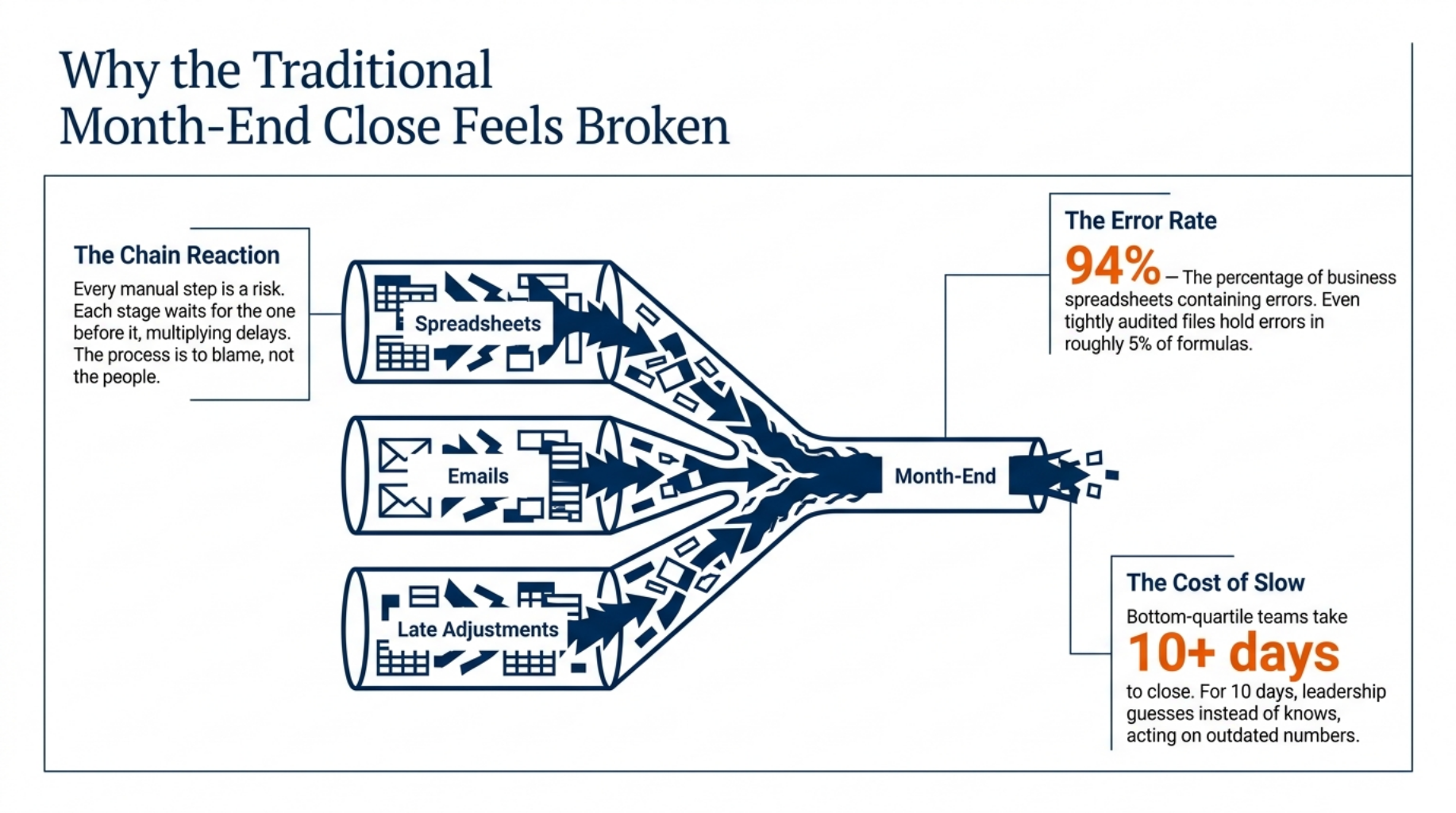
Every manual step is a risk waiting for month-end.
The month end close process is slow because each step waits for the one before it. Picture the last week of the month: spreadsheets multiply, email threads grow, and someone stays late to chase one missing invoice. The process is to blame, not the people.
Manual Reconciliations and Journal Entries
Teams match bank, sub-ledger, and ledger balances by hand. Repeat journals get re-keyed each month, and typos slip in. Ray Panko, a researcher at the University of Hawaii, reviewed audits of business spreadsheets and found errors in 94% of them.
In the audits that checked formulas one by one, about 5% of formulas held an error. A large reconciliation file can hold thousands of formulas.
Intercompany Matching and Last-Minute Adjustments
Entities post on different days, so balances do not agree at cutoff. Late invoices and accruals force rework and reopened periods. One construction group on the AWS Marketplace described emailing Excel reports between subsidiaries and adding them up by hand, until a shared system cut its close from two weeks to five days.
The Cost of a Slow Close
In APQC’s benchmark, the slowest quarter of organisations need 10 or more calendar days to close. For those 10 days, leaders guess instead of know. The team works long hours to deliver numbers that are already old.
So what changes when software does the routine work?
How AI Powers Financial Close Automation
Let AI match the easy items. Let people judge the hard ones.
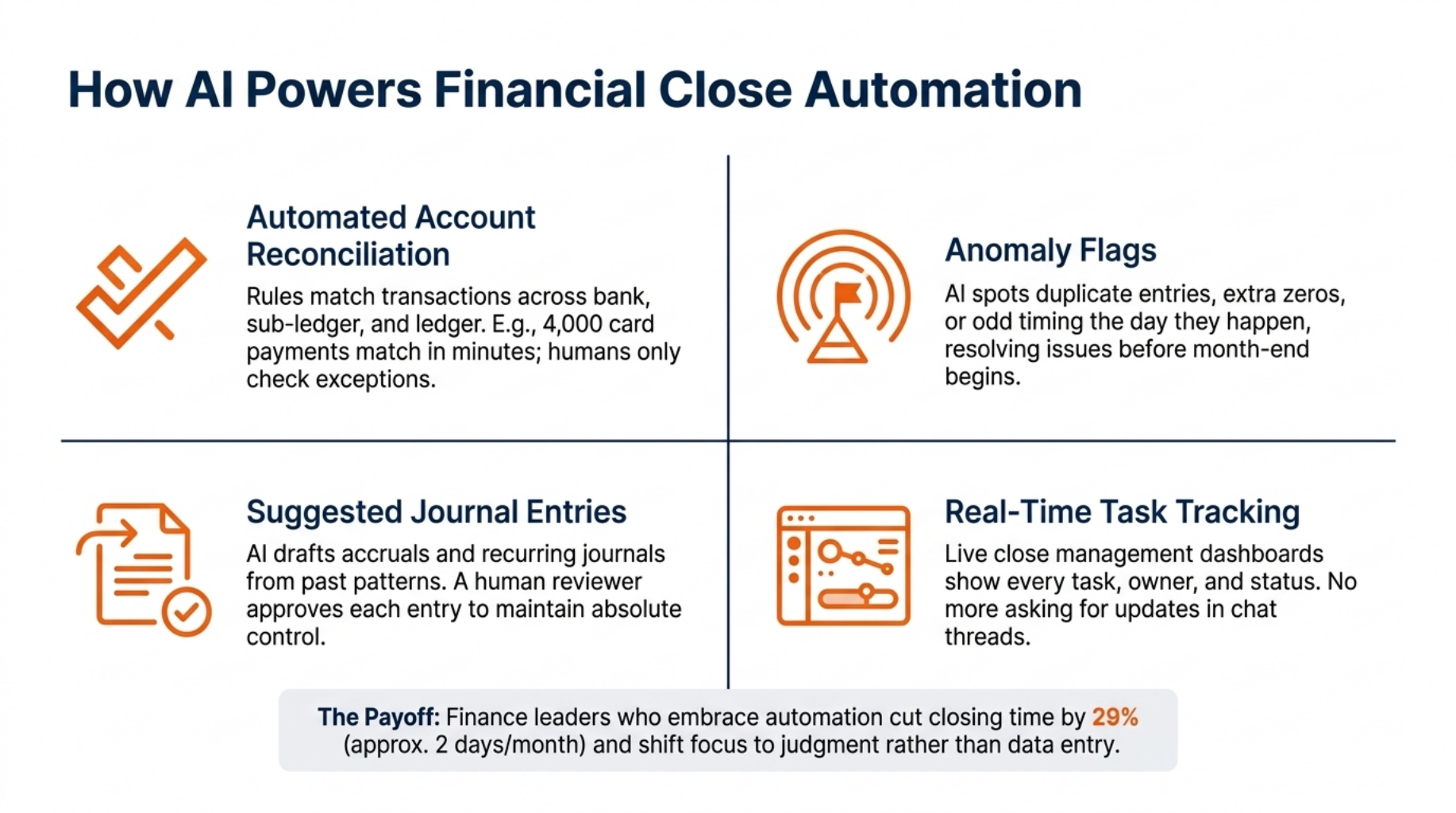
AI takes over repeat work and hands people only the items that require judgment. APQC reports that 31% of organisations already use AI in their record to report work, and another 39% are in the early stages. Each task below cuts hours from the close and lowers the chance of error.
Automated Account Reconciliation
Using AI to automate account reconciliations starts with rules that match transactions across bank, sub-ledger, and ledger records. Matched items clear on their own, and only exceptions reach your team. Picture 4,000 card payments in a month: the software pairs most of them in minutes, and your team checks the few that do not fit.
Anomaly Flags
AI spots odd amounts, duplicate entries, and unusual timing. A payment posted twice, or a journal keyed with an extra zero, gets flagged the day it happens. Early flags let teams resolve issues before they reach the close when time is short.
Suggested Journal Entries
Here is how to automate journal entries with AI: let it draft, and let a person approve. It builds accruals and recurring journals from past patterns. A reviewer approves each entry before it posts, so a person stays in control.
The payoff is real. Sage’s Close the Books research found that finance leaders who embrace automation cut their closing time by 29%, or about two days a month.
Real-Time Close Task Tracking
A live dashboard shows each task, its owner, and its status. Managers see delays as they happen and can act the same day. With close management software, nobody has to ask in a chat thread who still owes a reconciliation.
Now imagine these tools running all month, not only at the end.
From Periodic Close to Continuous Close
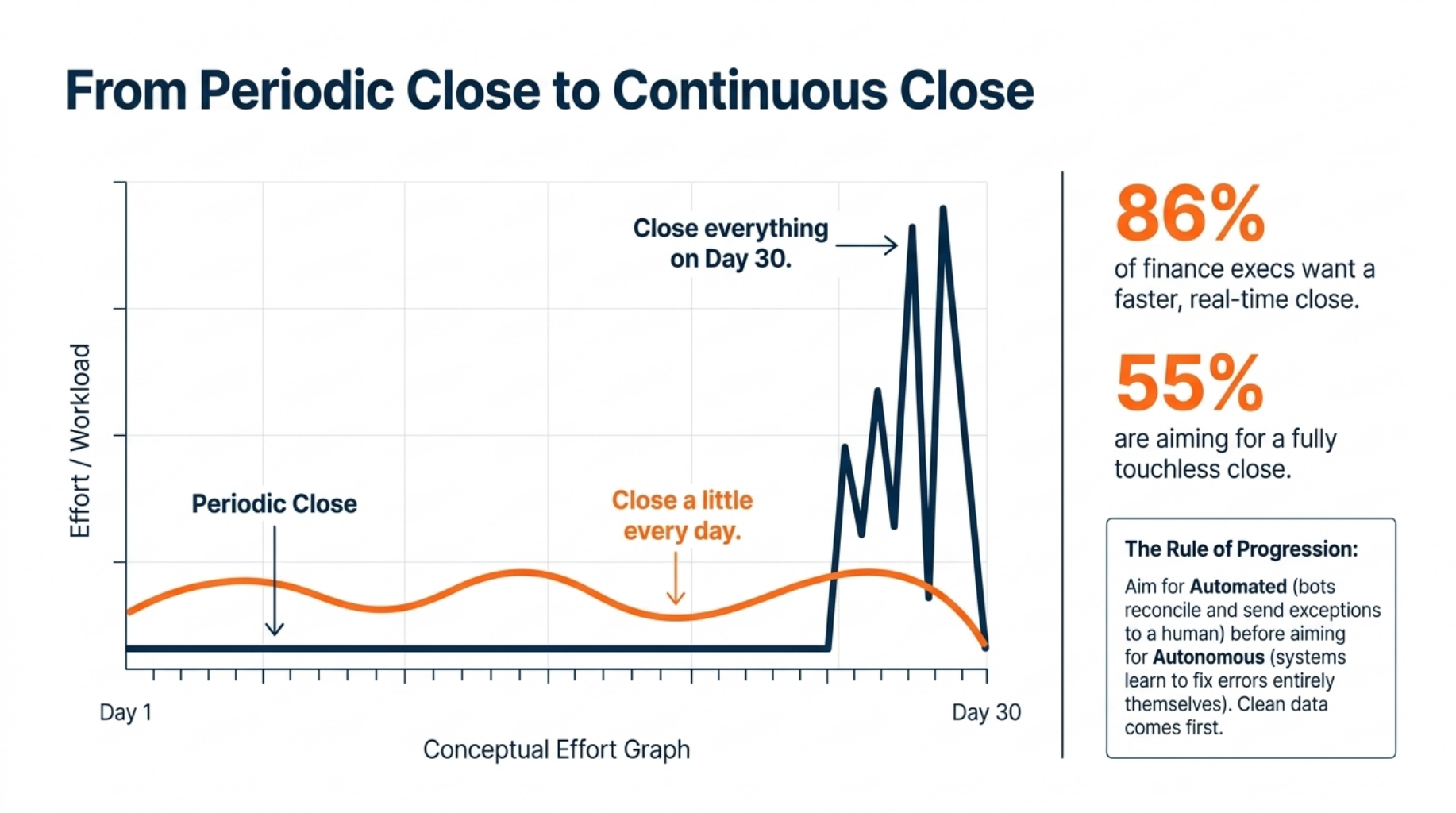
Close a little every day, not everything on day thirty.
A continuous close checks transactions as they post, so errors surface in days, not weeks. A Gartner survey of 155 finance executives found that 86% want a faster, real-time close. Another 55% are aiming for a touchless close.
What a Continuous Close Means
Each day, the system matches new transactions, and your team reviews the exceptions. Accruals roll forward as invoices arrive.
Moving from a periodic to a continuous financial close does not remove month-end work, but it shrinks it. By the last day, most of the work is done, and month-end becomes a review step, not a scramble.
Gartner draws a line between two ideas. In an automated close, a bot reconciles and sends exceptions to a person, while in an autonomous close, the system learns to fix errors itself. Aim for the first before you reach for the second.
What Has to Change First
Clean data and clear rules come first. Agree how to match, who approves, and what counts as an exception. Then give each task an owner across finance, AP, AR, and entity teams.
Gartner’s own analyst warned that many finance functions lack the skills and data readiness for full autonomy. Start with steady steps, not a leap.
Once you change how you work, you need numbers to prove it is working.
Metrics That Show Your Close Is Improving
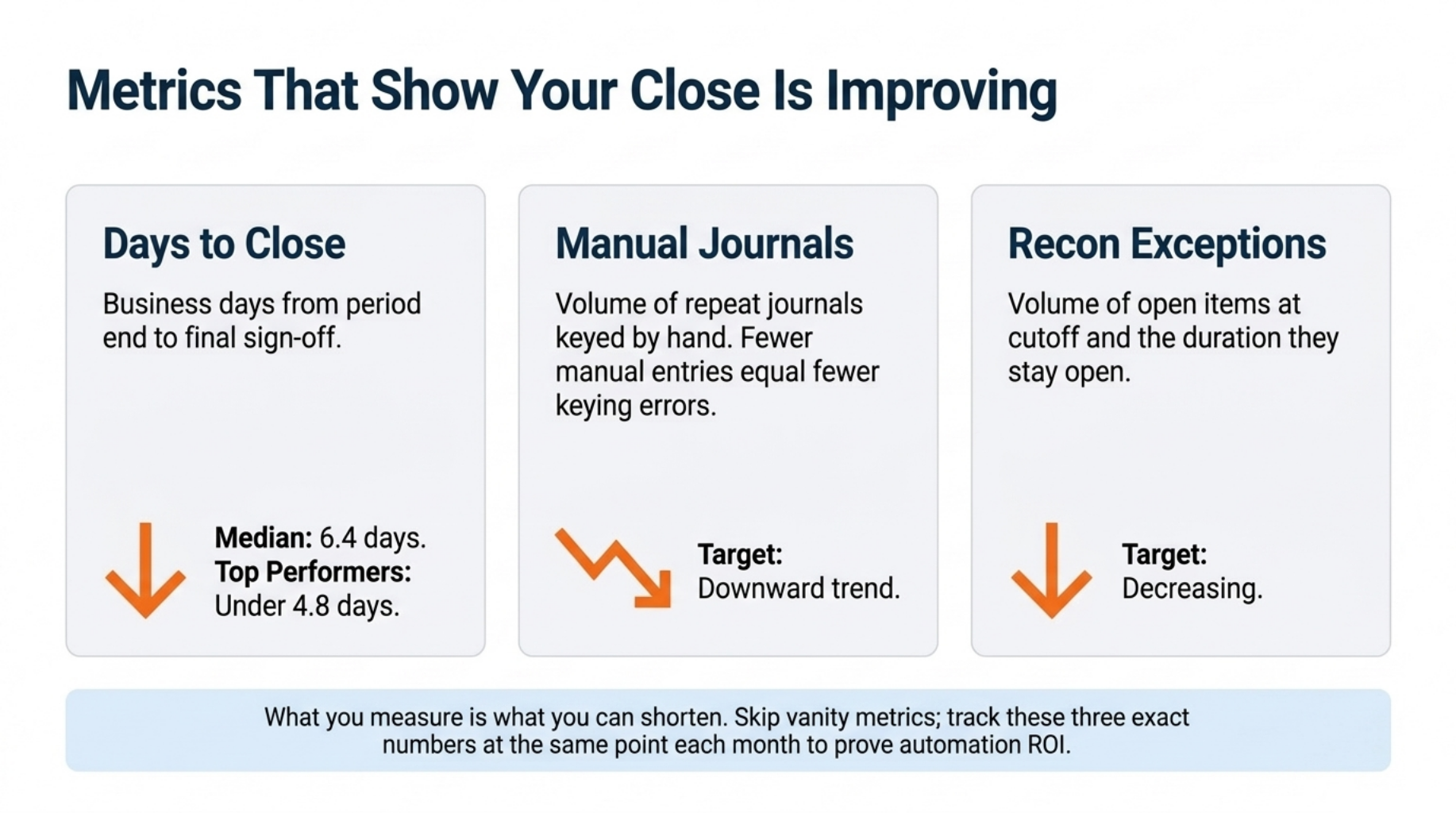
What you measure is what you can shorten.
Three metrics tell you most of what you need to know.
- Days to close: the business days from period end to final sign-off.
- Number of manual journals: a drop means fewer keying errors and less review.
- Reconciliation exceptions: the open items at cutoff, and how long they stay open.
Pull days to close from your close calendar. Count manual journals with a ledger report filtered by source, and list open reconciliation items on the cutoff day. Review all three at the same point each month.
APQC surveyed 2,300 organisations and found a median close of 6.4 calendar days, while top performers finish in 4.8 or fewer. If you want to know how to reduce days to close, track these three each month. Then set a target between your number and the top performer’s.
Add the share of accounts auto-reconciled and the on-time task rate once the first three are steady. Skip vanity numbers that do not link to close speed.
Before you set targets, find out where you stand today.
Close Maturity Assessment: Where Is Your Team Today?
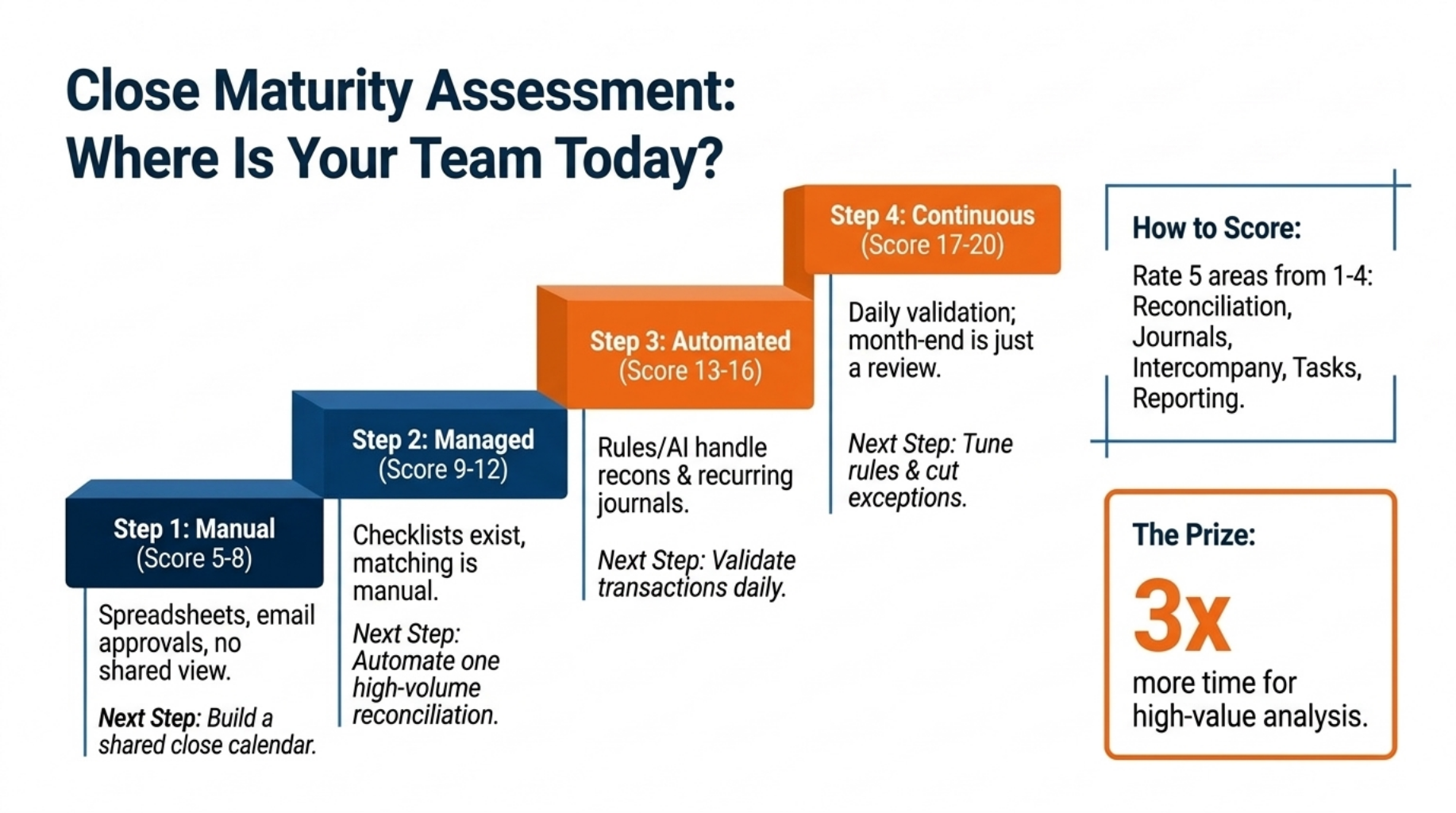
You cannot fix a close you have not scored.
This is a five-minute self score. Find the level that fits your team best, then note the next step.
- Level 1, Manual: spreadsheets, email approvals, and no shared view of tasks. Next step: build a close calendar.
- Level 2, Managed: a checklist and calendar exist, but matching stays manual. Next step: automate one high-volume reconciliation.
- Level 3, Automated: rules and AI handle reconciliations and recurring journals. Next step: validate transactions daily.
- Level 4, Continuous: transactions are validated daily, and month-end is a review. Next step: tune your rules and cut exceptions.
The climb pays off. Sage found that teams with the highest levels of automation have three times more time for high-value work than teams with the lowest.
How to Score Your Team
Rate five areas from 1 to 4: reconciliation, journals, intercompany, task tracking, and reporting. Add the scores. A total of 5 to 8 is Level 1, 9 to 12 is Level 2, 13 to 16 is Level 3, and 17 to 20 is Level 4.
Whatever your score, a clear checklist keeps everyone on track.
Month-End Close Task Checklist
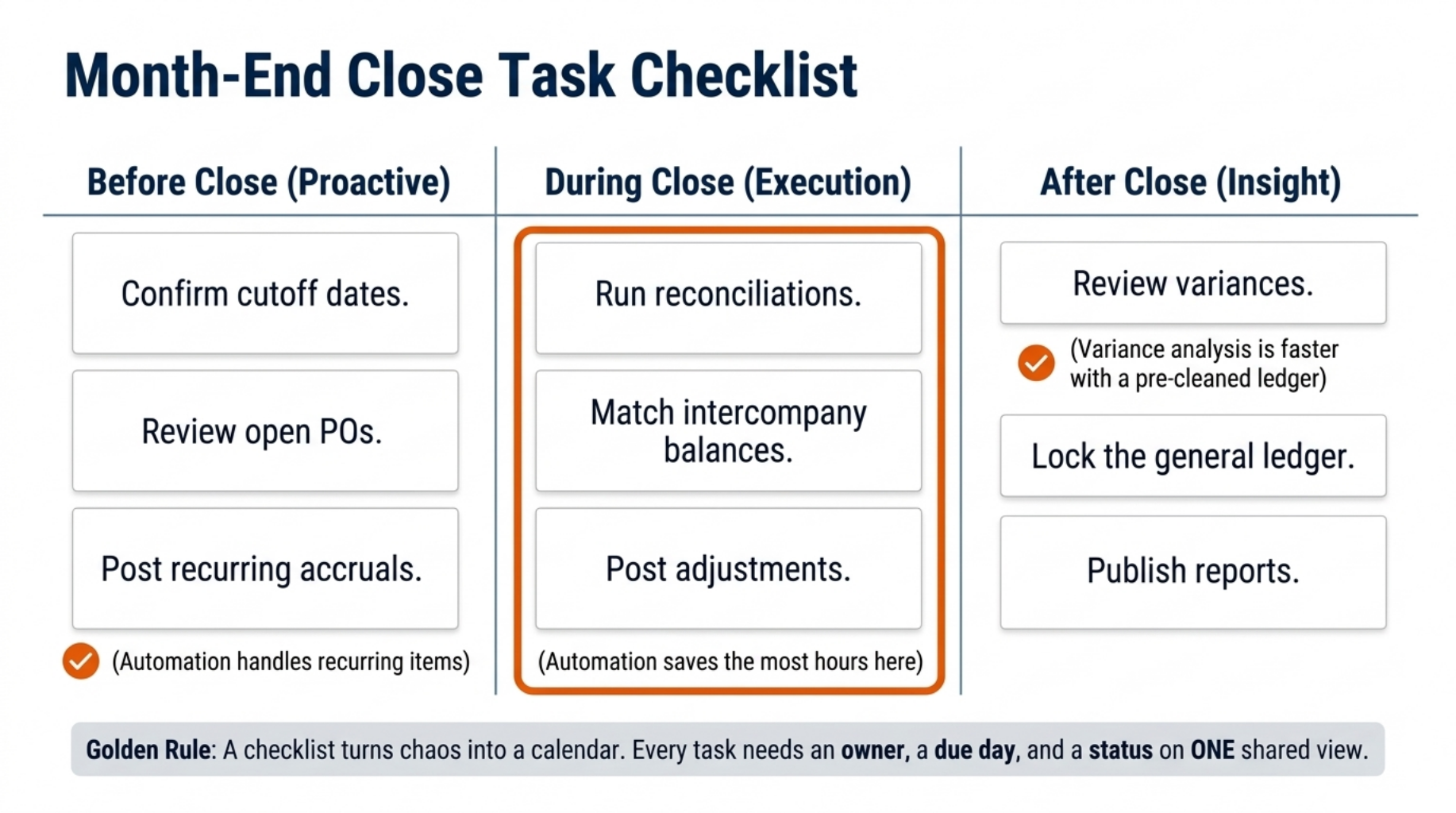
A clear checklist turns chaos into a calendar.
A good close checklist gives every task an owner, a due day, and a status. APQC’s guidance on streamlining the close says to define who owns each activity, set sub-ledger deadlines, and publish a close calendar that everyone can follow. Our Financial Close Maturity Scorecard and Task Checklist has the full version.
Keep the calendar on one shared page. Owners then see every due-day and status in one place, and nobody has to ask for an update.
Before Close
Confirm cutoff dates, review open POs, and post recurring accruals. Automation can post the recurring items for you.
During Close
Run reconciliations, match intercompany balances, and post adjustments. This is where automation saves the most hours.
After Close
Review variances, lock the period in the general ledger, and publish reports. Variance analysis goes faster when the ledger is already clean.
Now let us see how these steps look on a calendar.
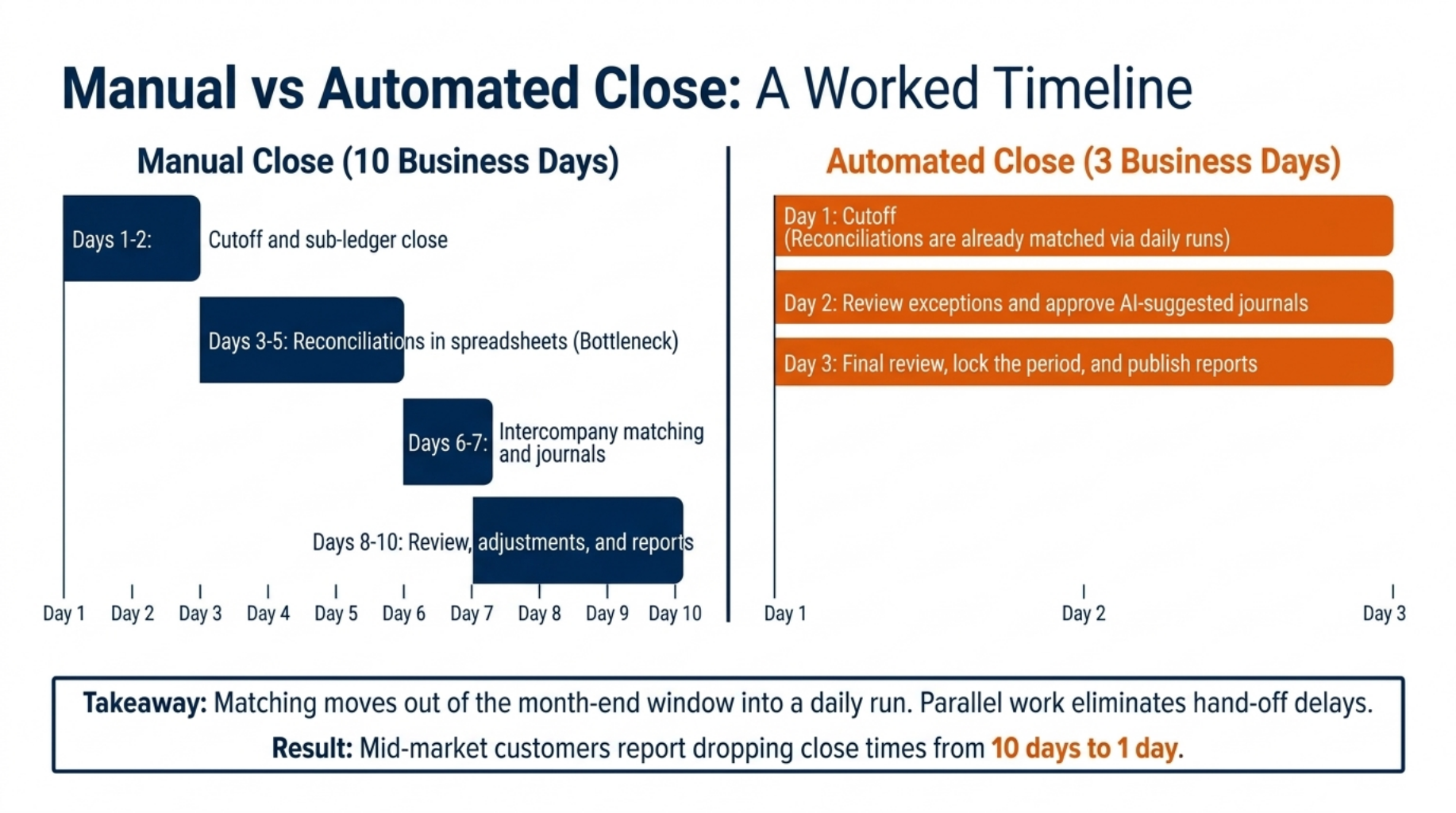
Manual vs Automated Close: A Worked Timeline
Ten days of scramble versus three days of review.
This is how to speed up the month-end close with automation, day by day. The timeline is an example, and results vary by company.
| Manual close (10 business days) | Automated close (3 business days) |
|---|---|
| Days 1 to 2: cutoff and sub-ledger close | Day 1: cutoff, with reconciliations already matched |
| Days 3 to 5: reconciliations in spreadsheets | Day 2: review exceptions and approve suggested journals |
| Days 6 to 7: intercompany matching and journals | Day 3: final review, lock the period, and publish reports |
| Days 8 to 10: review, adjustments, and reports |
Where does each hour go? Matching moves out of days 3 to 5 and into a daily run, and intercompany work runs alongside reconciliations, not after them. Review starts with a short list of exceptions, not a full ledger.
Manual Close: 10 Business Days
Each stage waits for the last, and each handoff adds rework. An error found on day 8 sends people back to day 3. The team spends most of its time matching and fixing, not reviewing.
Automated Close: 3 Business Days
The gain comes from parallel work, fewer errors, and less rework. Matching happens during the month, so day 1 starts clean. Nucleus Research interviewed mid-market Acumatica customers and listed a drop in month-end close time from 10 days to one day among their benefits.
Speed matters little if auditors cannot trust the results.
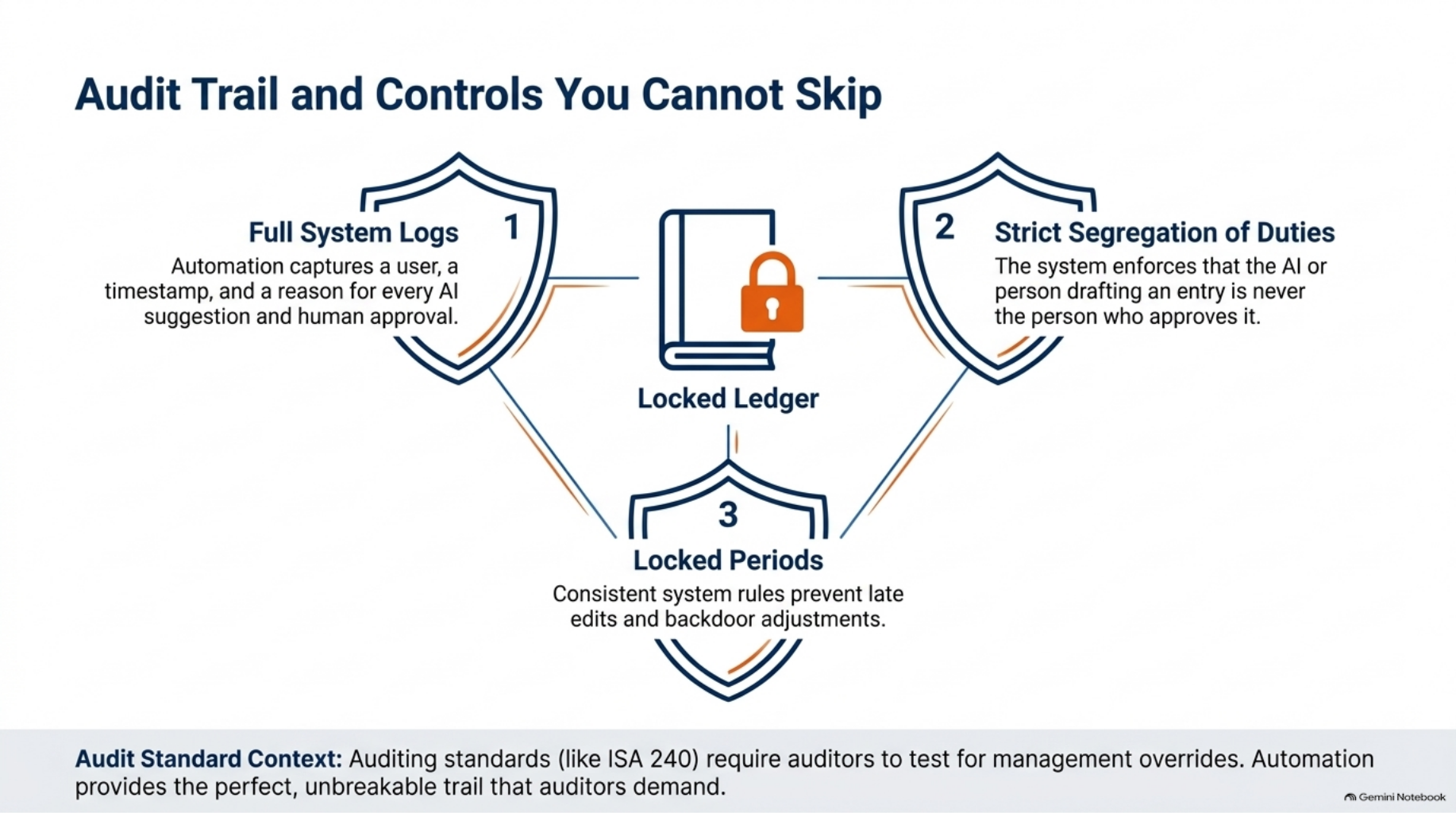
Audit Trail and Controls You Cannot Skip
Speed means little without a clean audit trail.
Automation does not weaken control. It adds structure that spreadsheets lack. Auditing standards such as ISA 240 require auditors to test journal entries for signs of management override, so every entry needs a clear trail.
What Auditors Ask For
Auditors ask for support for each journal, proof of review, and a change history. Every action requires a user, a time stamp, and a reason. A folder of spreadsheets cannot give you that, but a system log can.
How Automation Strengthens Controls
Consistent rules apply to every transaction, and locked periods stop late edits. Full logs record each AI suggestion and each human approval. Approval rules and segregation of duties stay in place.
Segregation of duties means the person who drafts an entry is not the person who approves it.
Strong controls require a strong system underneath them.
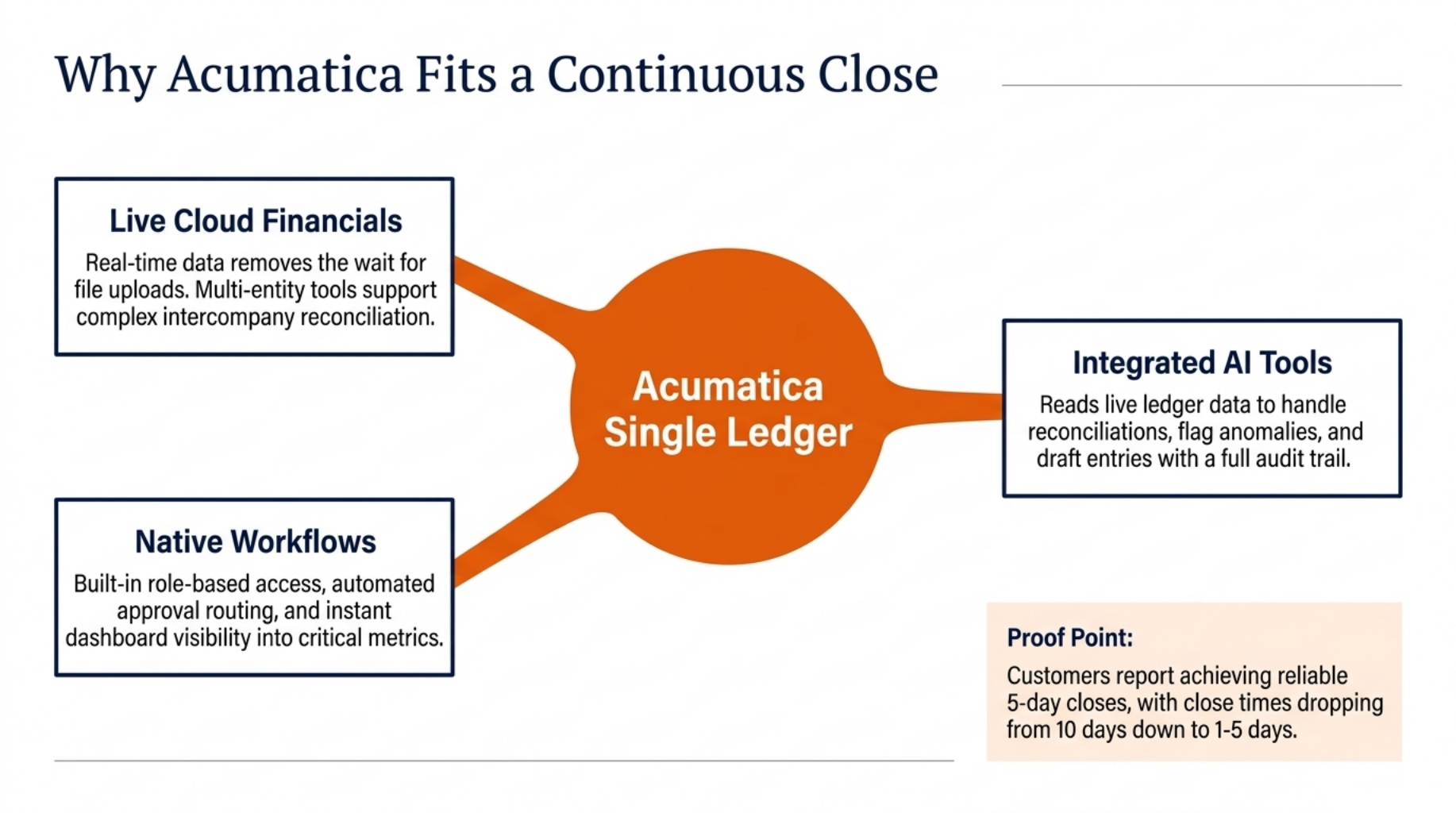
Why Acumatica Fits a Continuous Close
One ledger. Live data. A close that keeps pace.
Acumatica gives finance teams cloud financials, workflows, and approvals on one platform, and AI tools can sit on top. BLD Brands, a customer profiled by Acumatica, reports five-day month-end closes. Nucleus Research also listed instant visibility to critical metrics among the benefits customers described.
Cloud Financials on One Ledger
Live data removes the wait for file uploads and consolidations. Multi-entity tools and workflows support intercompany reconciliation across your group. Role-based access and audit logs support your control needs.
AI Tools That Plug Into Acumatica
AI tools built for Acumatica read live ledger data. They handle reconciliation, anomaly flags, and journal suggestions. Approved entries post back into the ledger with a full trail.
You do not have to change everything at once.
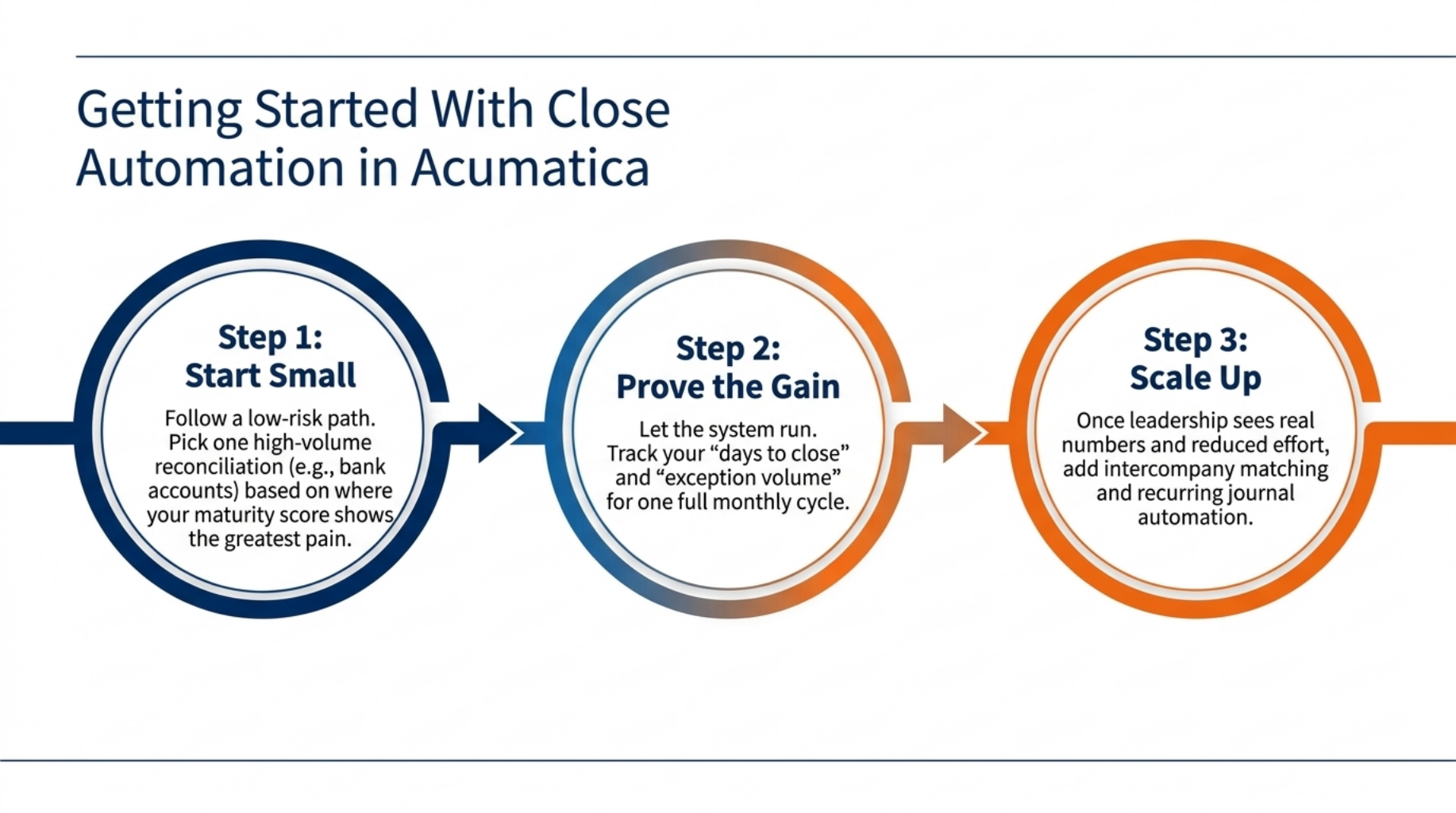
Getting Started With Close Automation in Acumatica
Start small. Prove the gain. Then scale the close.
Nucleus Research found that Acumatica customers suggest a phased rollout, which limits disruption and allows changes along the way. Follow a low-risk path:
- Pick one high-volume reconciliation, such as bank accounts. Your maturity score shows where the pain is greatest.
- Track days to close and exceptions for one full cycle.
- Add intercompany matching and recurring journals.
Each step gives you proof, so you can show leaders real numbers before you widen the scope.
Wrapping Up
You now have a clear path, so here are the key points to take with you.
- Financial close automation cuts days from the close by clearing routine matching and journal work.
- A continuous close finds errors early, so month-end becomes a review, not a rush.
- Clear metrics, strong controls, and a live audit trail keep speed and accuracy together.
Book a demo to see AI-powered financial close automation running on Acumatica.
FAQ
What is financial close automation?
Financial close automation uses software and AI to handle reconciliations, journals, and task tracking so the close runs faster with fewer errors.
How does AI automate account reconciliations?
AI matches transactions across bank, sub-ledger, and ledger records, clears the matches, and sends only the exceptions to your team.
What is a continuous close?
A continuous close validates and reconciles transactions as they post, so month-end is a short review instead of a rush.
How long should a month-end close take?
Manual teams need ten or more business days, while strong automated teams close in three to five.
Does automation weaken audit controls?
No, automation adds time stamps, approval steps, and consistent rules that give auditors a clear trail.