



Summary
The text explains how true multi-warehouse inventory visibility in an ERP (using Acumatica as an example) is more than showing “on-hand” stock, it requires consistent definitions, location tracking, controlled transfers, allocation visibility and clear sourcing/fulfilment rules.
When teams adopt five agreed stock statuses, proper warehouse/bin structure, scanning and two-step transfers for long-distance moves, they reduce split shipments, urgent transfers and reconciliation issues. A phased rollout, hands-on training, daily checks and a simple ROI model help make visibility stick.
Key points
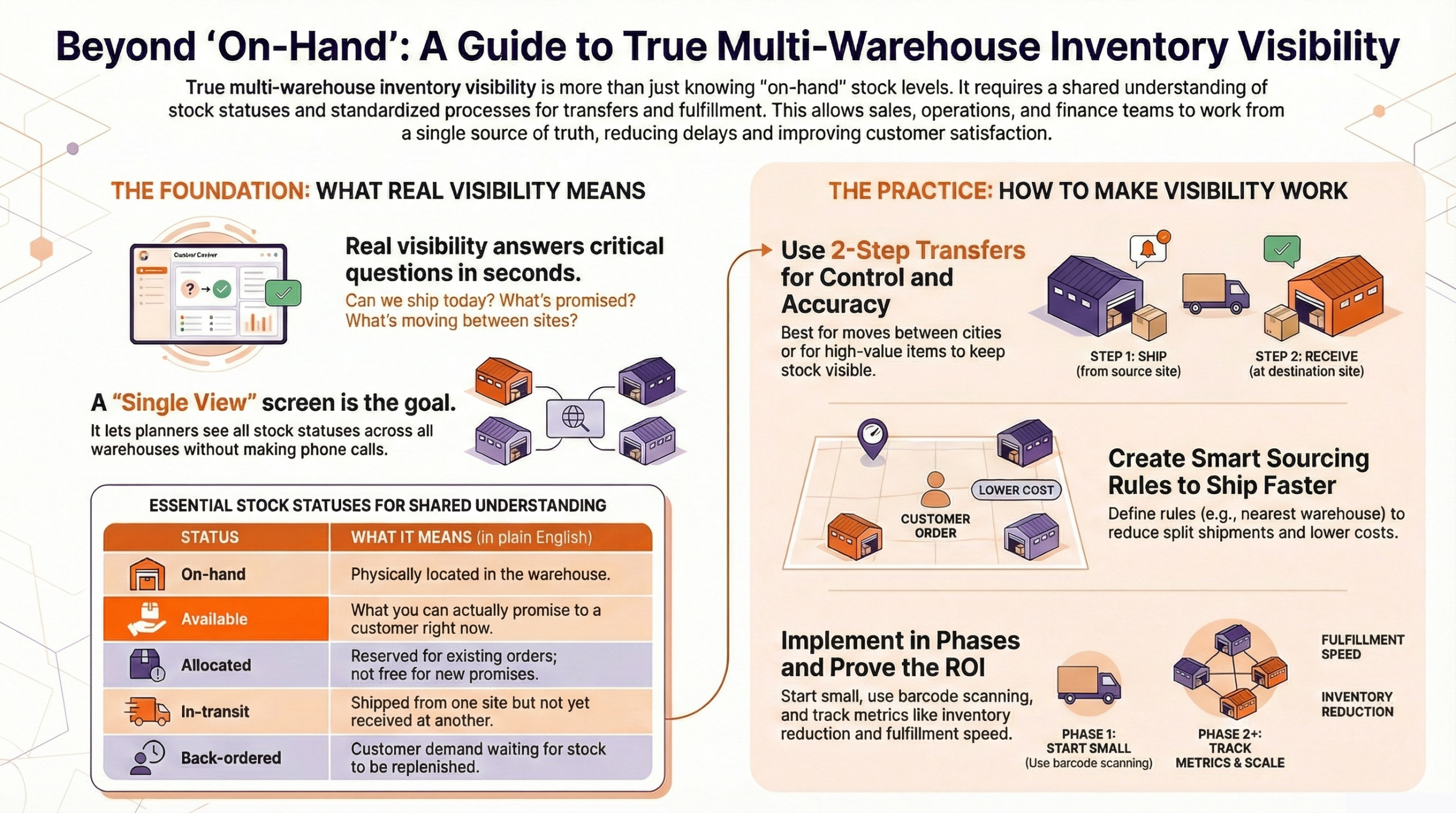
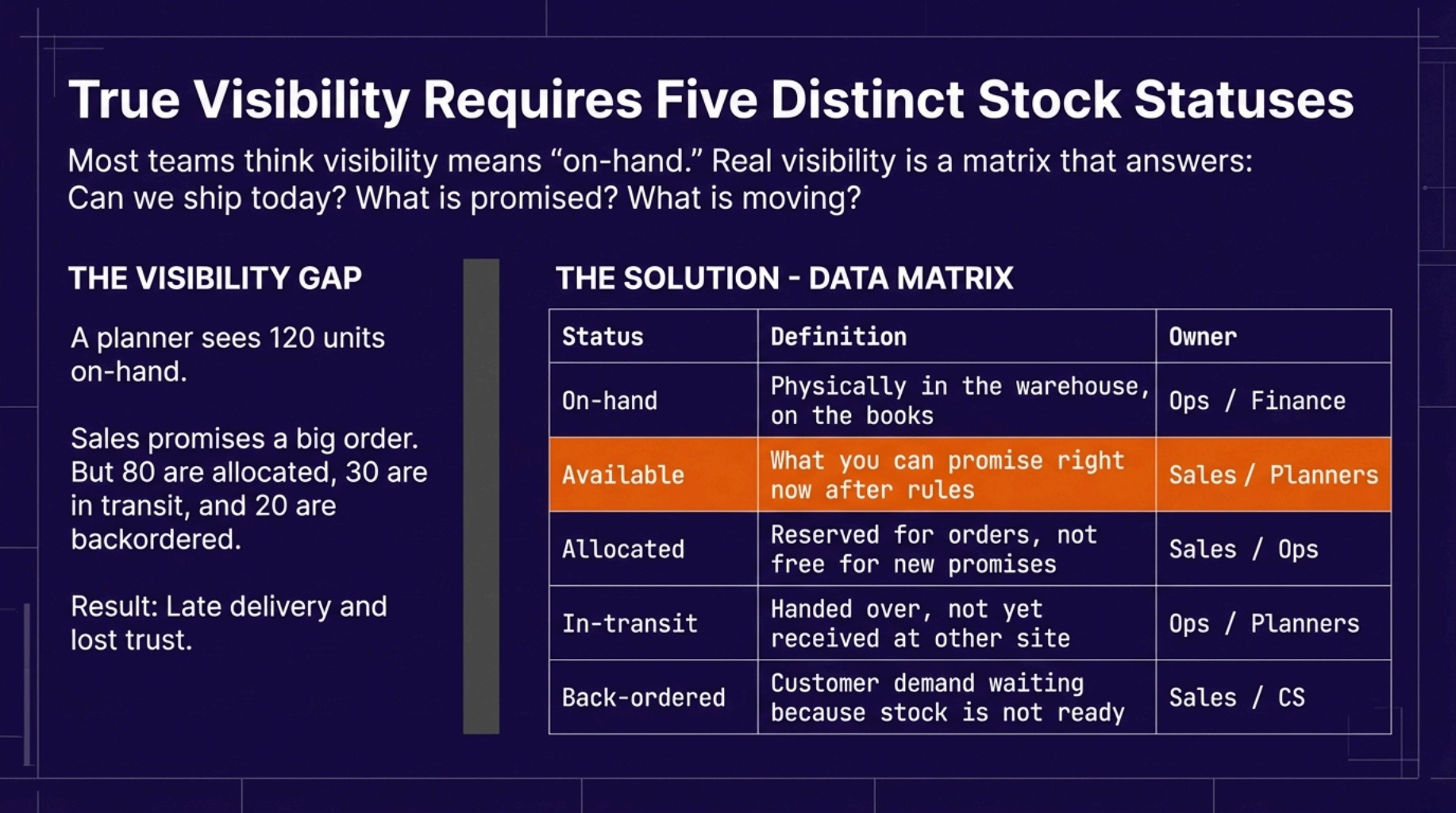
- Five shared stock statuses everyone must see: On-hand, Available, Allocated, In-transit, Back-ordered — use these labels everywhere to avoid misunderstandings.
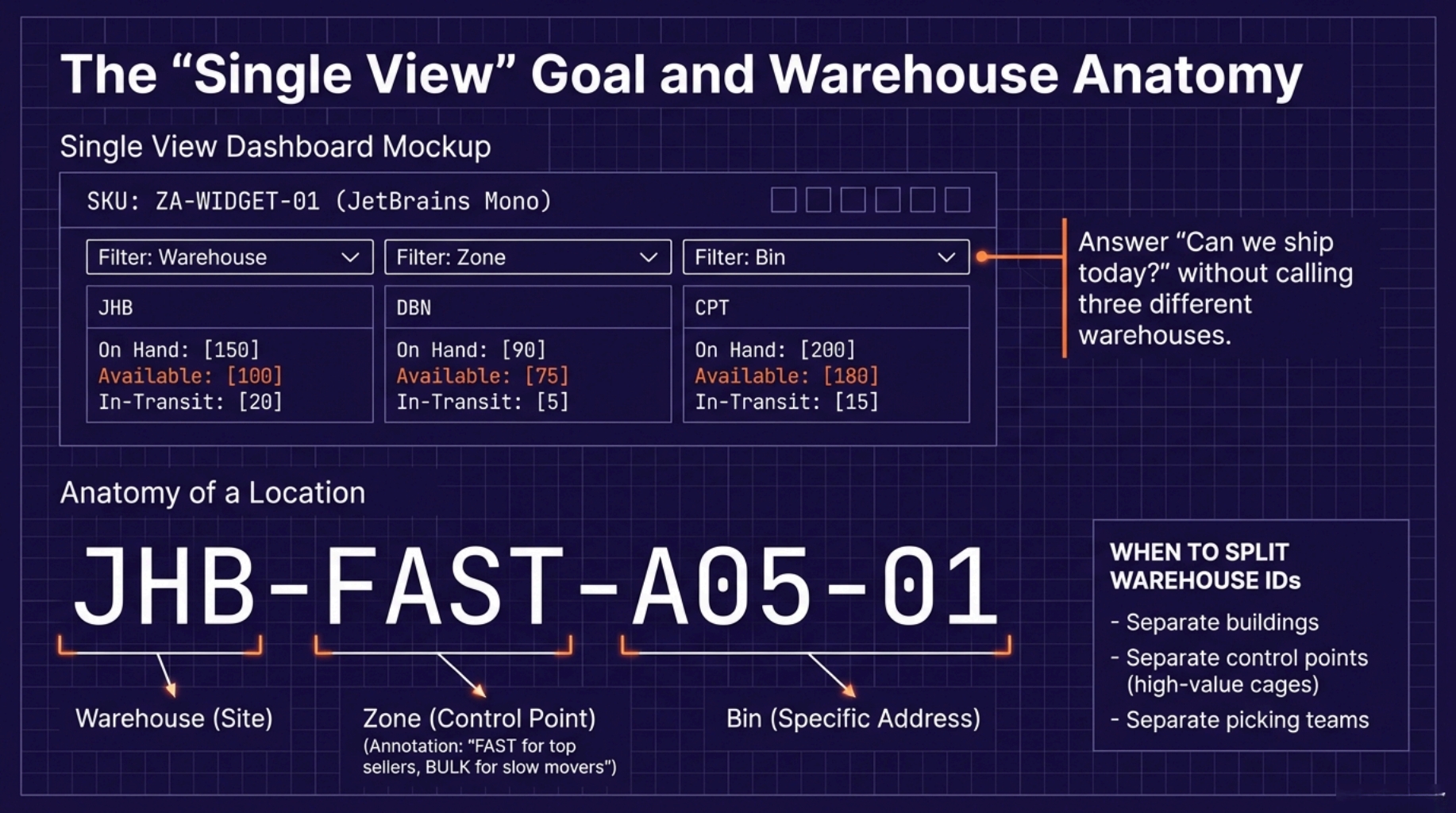
- Single view: show all five statuses by SKU across warehouses (filter by warehouse/zone/bin) so planners can answer “Can we ship today?” without calling sites.
- Warehouse setup and location tracking must match floor practice: simple, consistent naming (e.g., JHB-FAST-A05-01), correct unit-of-measure, and only the detail staff will actually use.
- Transfers: use 2-step in-transit transfers for different cities/high-value items to keep visibility and finance clean; reconcile inventory valuation to GL regularly.
- Sourcing rules: define predictable rules (e.g., nearest warehouse, most available stock, priority per region, cost-based) to reduce split shipments and speed dispatch.
- Backorders and exceptions: use controlled partial shipments, clear ownership for backorder follow-up, and daily exception queues to act on late or stuck lines.
- Rollout approach: phase implementation (clean master data, train with hands-on scenarios, start small), use barcode scanning/WMS, run daily KPIs (pick accuracy, scan compliance, transfer ageing).
- Measure ROI: baseline average inventory and error/expedite costs, set targets (e.g., 25% inventory reduction, faster fulfilment), and track baseline → week 4/8/12 improvements.
- Practical controls: lock unit measures, keep item master clean, keep bin usage light, and use SOPs and one-page checklists at go-live.
Set up warehouses, bins, and location tracking the right way
Multi-warehouse inventory visibility ERP South Africa only works when your warehouse setup matches real life. If the system says “Bin A01” but the team calls it “Top Shelf”, you will get wrong picks, messy transfers, and angry phone calls.
Acumatica supports tracking stock by warehouse and by locations like aisle, rack, shelf, and bin, so you can see where items sit, not just how many you own. The trick is choosing a level-of-detail staff can follow all day.
Warehouse structure for 3–10 sites
Start with names that are simple and consistent. Fancy names break reports and confuse new staff.
A pattern that works:
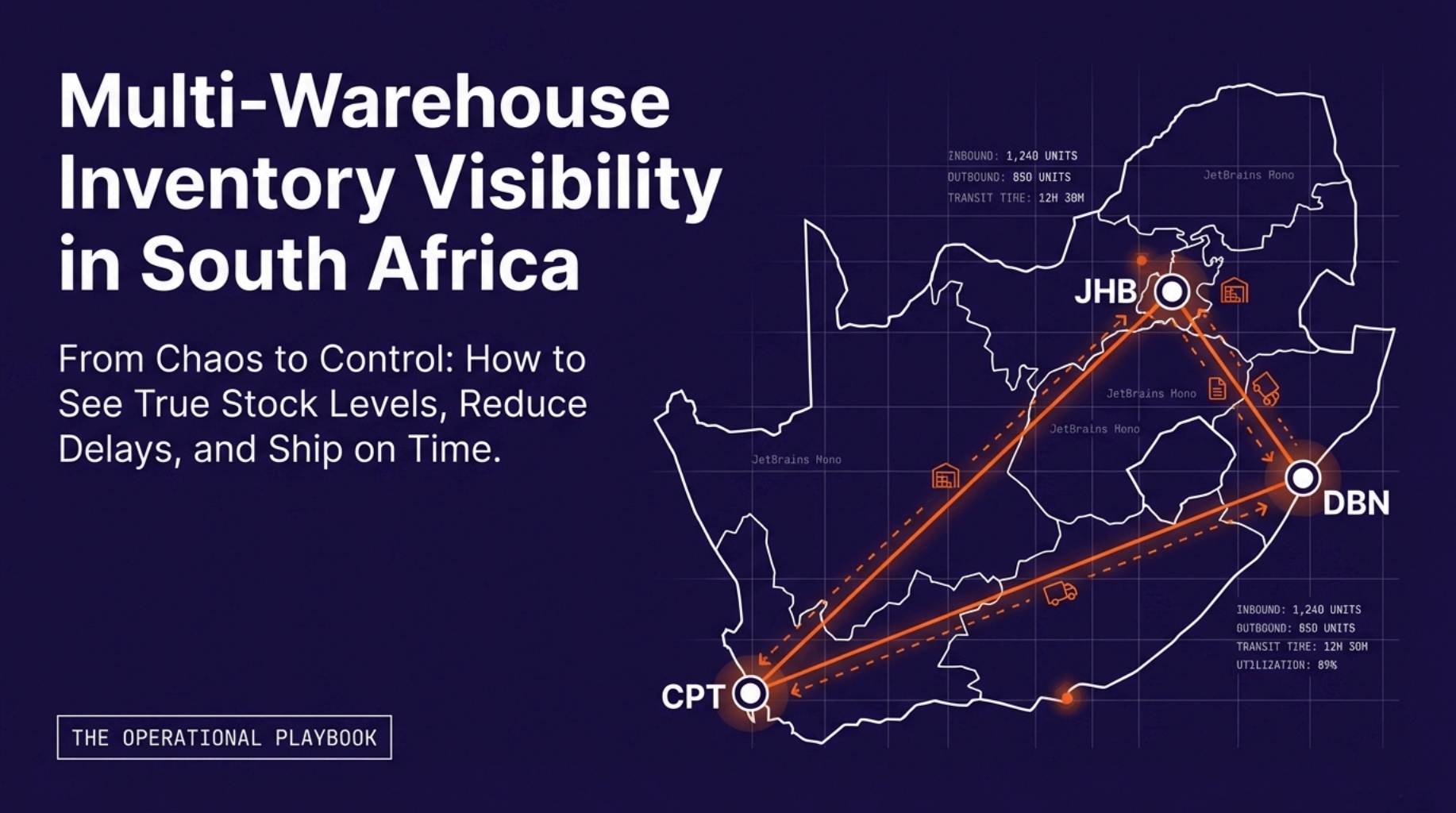
- Warehouse: JHB, DBN, CPT
- Zone: FAST, BULK, RETURNS
- Aisle or bay: A05, B12
- Bin: 01, 02
Example format:
| Level | Example |
|---|---|
| Warehouse | JHB |
| Zone | JHB-FAST |
| Bin | JHB-FAST-A05-01 |
When to split warehouses:
- Separate buildings, even if they are close
- Separate control points, like bonded stock or high-value cages
- Separate picking teams with different rules
Two rules that save pain later:
- Lock units of measure early (case, each, pallet) so transfers do not create rounding issues.
- Clean item master data before you load locations because bad items multiply across every site.
Bin, shelf, and zone tracking that warehouse teams will actually use
Location tracking fails when it feels like “admin work.” Your setup must match the floor.
Use this simple choice:
- Pick from fixed spots daily, use bins.
- Pick from broad areas, use zones.
- Layout changes often, keep bins light and rely on scanning.
Practical zones:
- FAST for top sellers near packing
- BULK for pallets and slow movers
- RETURNS to stop bad stock leaking into saleable bins
Make put-away easy. In Acumatica WMS, users can scan the destination location when putting items away, which helps keep stock in the right place.
Transfers between warehouses with clean audit trails
Transfers are where visibility breaks. One site ships stock out, the other site “has not seen it yet,” and the system shows two different stories. That is when sales promises stock that is already on a truck.
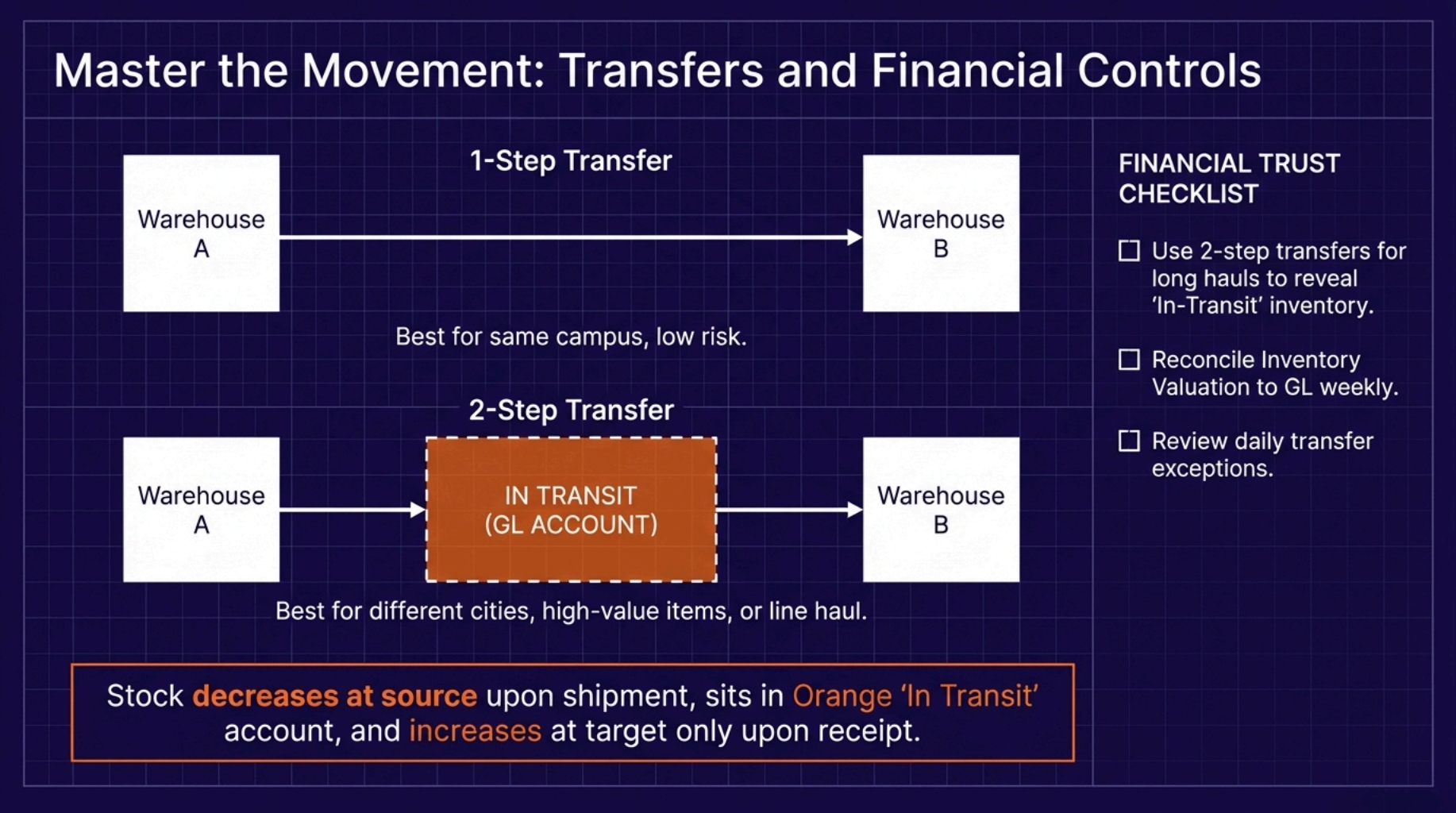
Acumatica supports one-step and two-step transfers. Two-step transfers use an in-transit account and are completed by a receipt at the target warehouse, so the move stays traceable.
1-step vs 2-step transfers, when to use each
Think of it like this:
- 1-step transfer: quickest, the least control
- 2-step transfer: more control, better for distance and risk
Quick guide:
| Your reality | Best choice |
|---|---|
| Same campus, low risk | 1-step |
| Different cities, courier line haul | 2-step |
| High-value items | 2-step |
| New team, new process | 2-step |
How in-transit should behave:
- Stock decreases at the source when shipped
- It stays “in transit” until the receiving team confirms it
- Stock increases at the target only after receipt
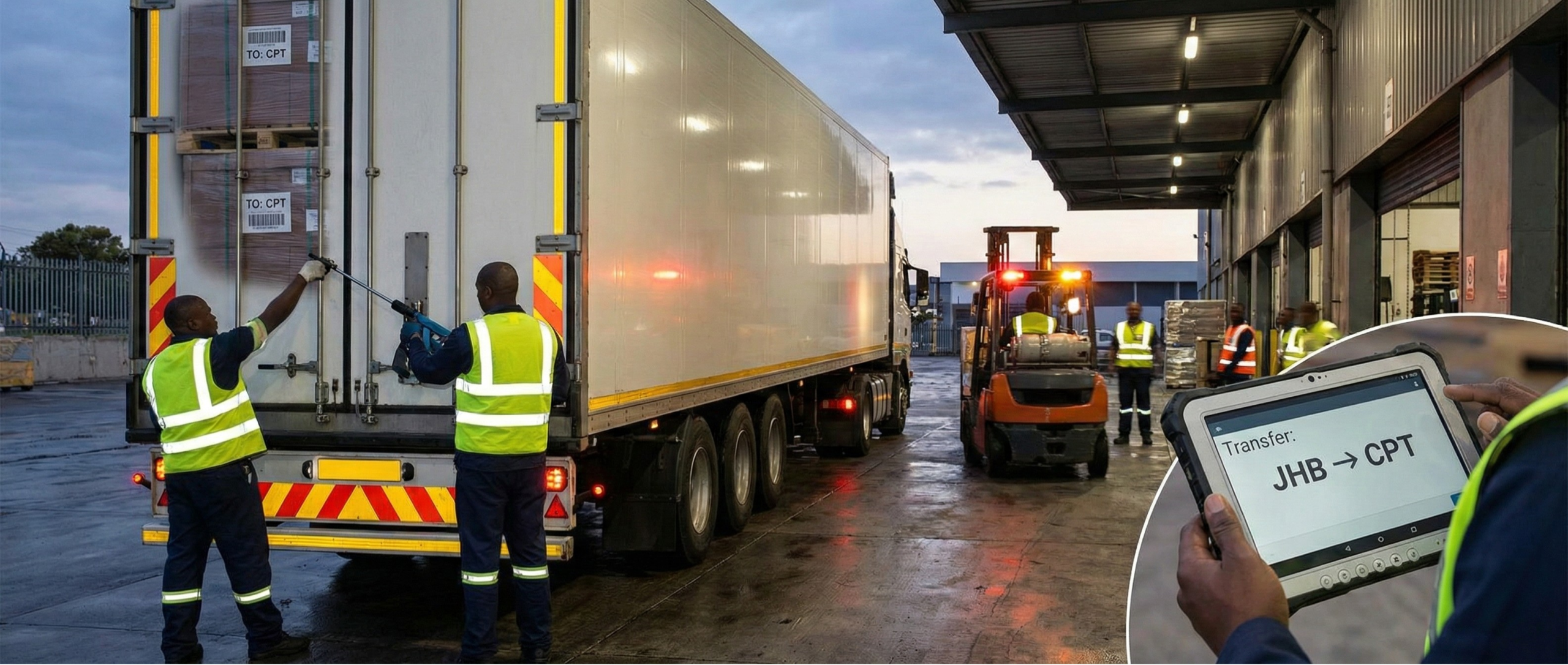
Mini example: Johannesburg sends 20 units to Durban. With 2-step, ops sees it in transit, sales stops promising it from Durban until it lands, and finance has a clean trail.
Automatic financial postings and controls finance will trust
Warehouse teams move boxes. Finance tracks value. If transfers do not line up with the General Ledger, month-end becomes a hunt.
Acumatica’s guidance for inventory reconciliation includes comparing inventory valuation reports to the GL trial balance, then working forward from the last balanced point. Build your transfer process, so these checks stay boring.
Controls that keep everyone calm:
- Use 2-step for long-distance moves, so in-transit is visible, not hidden
- Set release rules, who can release shipments and receipts
- Review transfer exceptions daily (late receipts, quantity mismatches)
- Reconcile inventory to GL on a set rhythm, not only at month-end
Faster fulfilment with smarter sourcing rules
Multi-warehouse inventory visibility ERP South Africa is not only about seeing stock, it is about shipping from the best place, first time, without drama. If you keep dispatching from the wrong warehouse, you pay twice, once in courier costs, and again in late deliveries.
Acumatica includes order orchestration features that can help with warehouse selection for fulfilment using configurable business rules, so your team does not have to guess or override every order. The goal is simple, fewer split shipments, faster dispatch, and fewer “sorry, we are out of stock” calls.
Here’s the mindset shift that helps, treat sourcing like a set of rules, not a daily debate.
Rules that reduce split shipments and speed up dispatch
Good sourcing rules feel fair and predictable. People follow them because they make sense.
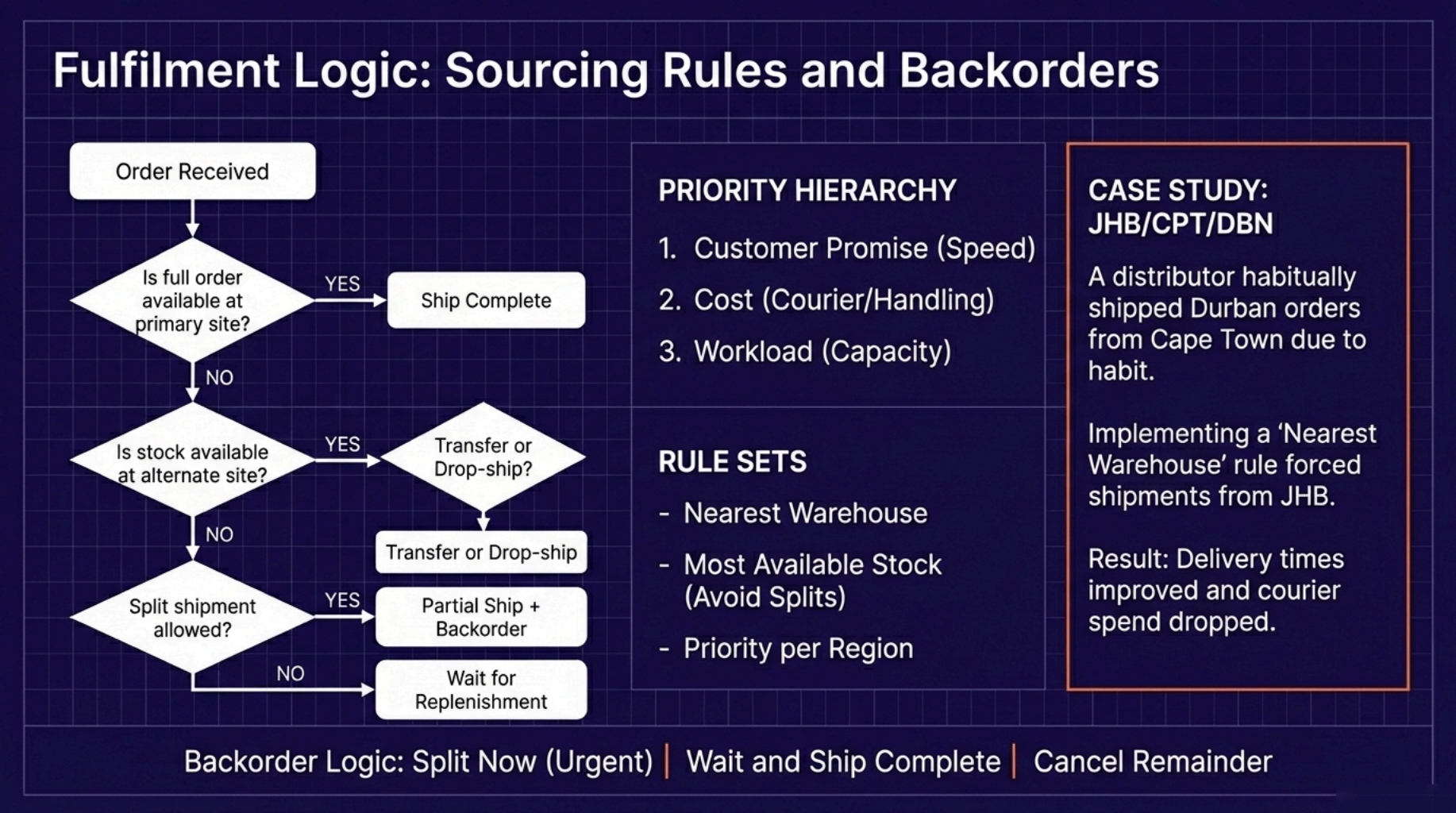
Start with three priorities, in this order:
- Customer promise (speed and service level)
- Cost (courier, handling, extra touches)
- Workload (warehouse capacity today)
Common rule sets that work well:
- Nearest warehouse: best when delivery speed matters most.
- Most available stock: best when you want to avoid partials.
- Priority warehouse per region or key customer: best when you have SLAs or special stock.
- Cost-based: best when courier and handling costs swing a lot.
Two things to watch in Acumatica:
- Availability vs allocation: “On hand” is not the same as “available.” Use the right view so you do not promise stock that is already reserved. The Inventory Allocation Details screen is designed to show how an item is distributed across warehouses and locations, including on-hand and related quantities.
- Shipment warehouse limits: In standard flows, shipments are tied to a single warehouse, which is why split shipments can happen if items are assigned to different warehouses.
A simple test you can run with real orders:
- Pick 20 recent orders that caused late delivery or split shipments.
- Apply one rule set (for example, “most available stock, then nearest”).
- Check what changes, number of shipments, delivery time, and courier cost.
Visual suggestion: a basic flowchart:
- “Is full order available at one warehouse?”
- Yes, ship from that warehouse.
- No, “Can we transfer in time?”
- Yes, transfer and ship.
- No, split shipment or backorder, based on your promise.
Micro-story you will recognise a distributor had stock in Johannesburg and Cape Town, but kept shipping Durban orders from Cape Town because “that’s what the team always does.” Once they set a simple rule to ship Durban orders from Johannesburg when available, delivery times improved and courier spend stopped creeping up.
Backorders and partial fulfilment without customer chaos
Backorders are normal. Chaos comes from not knowing what happens next.
In Acumatica, partial shipping can be controlled with shipping rules. If you select Back Order Allowed, you can ship what is available now and ship the remainder later as goods arrive. When a partial shipment is confirmed, remaining open quantities can be classified as backordered, and the order status reflects that change.
Use clear rules, so customers get steady updates:
- Split now when the customer needs part of the order urgently.
- Wait and ship complete when the order is useless without all lines.
- Cancel remainder when the customer only wanted what was in stock.
To keep your team focused, use an exception approach:
- Track only what needs action today, late lines, backorders ageing, and items stuck in “booked but not available.”
- If you use replanning for back orders, make sure the team knows what triggers it and when to run it because it moves backordered allocations back into a shippable state.
Internal link suggestion: “How to cut stock-outs with reorder points”
Quick check for your operation: when an item is backordered, who owns the next step, sales, planning, or purchasing? If the answer is “everyone,” you will get missed follow-ups.
Implementation plan for multi-warehouse teams in South Africa
Multi-warehouse inventory visibility ERP South Africa will not “stick” because the software is smart. It sticks when the warehouse team trusts it, and uses it under pressure.
The safest rollout is phased. Start with one warehouse, or one workflow across all warehouses, like transfers. Clean your data before go-live because bad item codes and messy units of measure turn into daily friction. Acumatica’s own guidance stresses getting inventory data and processes right so reconciliation and daily work stay accurate.
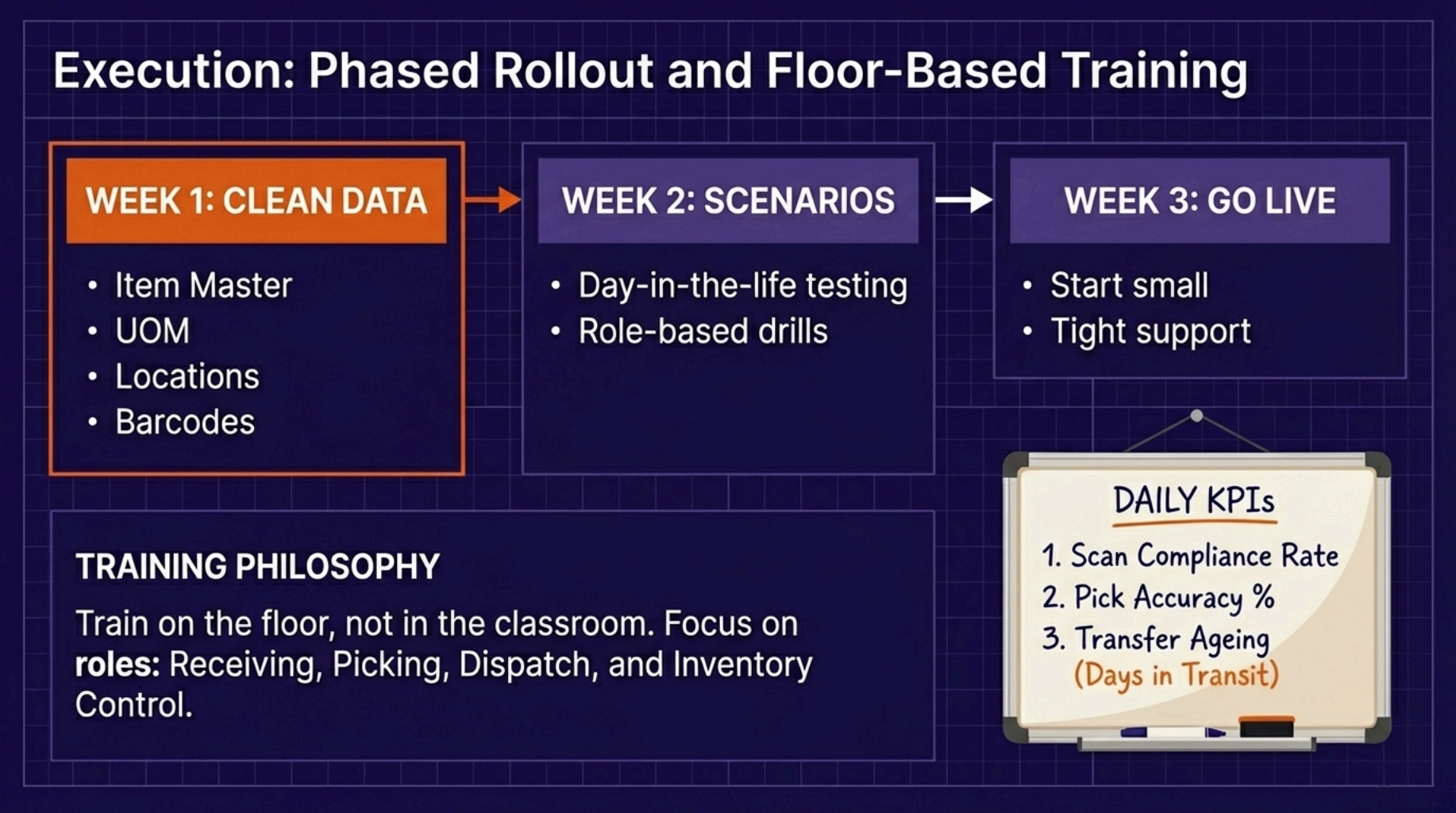
A simple rollout that works:
- Week 1: clean item master, units, locations, barcodes
- Week 2: train, test, and run “day-in-the-life” scenarios
- Week 3: go live with tight support, then expand
Staff training that works on the warehouse floor
Warehouse training fails when it is classroom-only. Keep it short, hands-on, and built around real tasks.
Train by role:
- Receiving, scan, put-away, label fixes
- Picking, pick path, substitutions, exceptions
- Dispatch, packing checks, staging, courier handover
- Supervisor, approvals, exception queue, cycle counts
- Inventory control, adjustments, variances, transfer ageing
Use a “day one standard” board near the team:
- Scan compliance rate
- Pick accuracy
- Transfer ageing (how long stock sits in transit)
Acumatica WMS supports barcode scanning for warehouse transactions, which is why role-based scanning practice matters.
Visual idea: a one-page SOP poster with 6 steps for receiving and put-away.
Go-live checklist, data rules, and early warning signals
A checklist stops panic. Data rules stop repeat mistakes.
Go-live must-dos:
- Items, units of measure, warehouse locations, and barcodes are clean and consistent
- Open sales orders and purchase orders are confirmed
- In-transit transfers are either completed or clearly parked
First-week warning signals (watch daily):
- Backorders ageing and sudden spikes
- Transfers stuck in transit
- Pick errors and re-picks
- Cycle count variances
If one of these jumps, fix the process, not only the numbers.
ROI and proof, build the business case
Multi-warehouse inventory visibility ERP South Africa should earn its keep in cash, service, and fewer daily fires. Leaders do not want hope, they want a simple model they can test against real numbers.
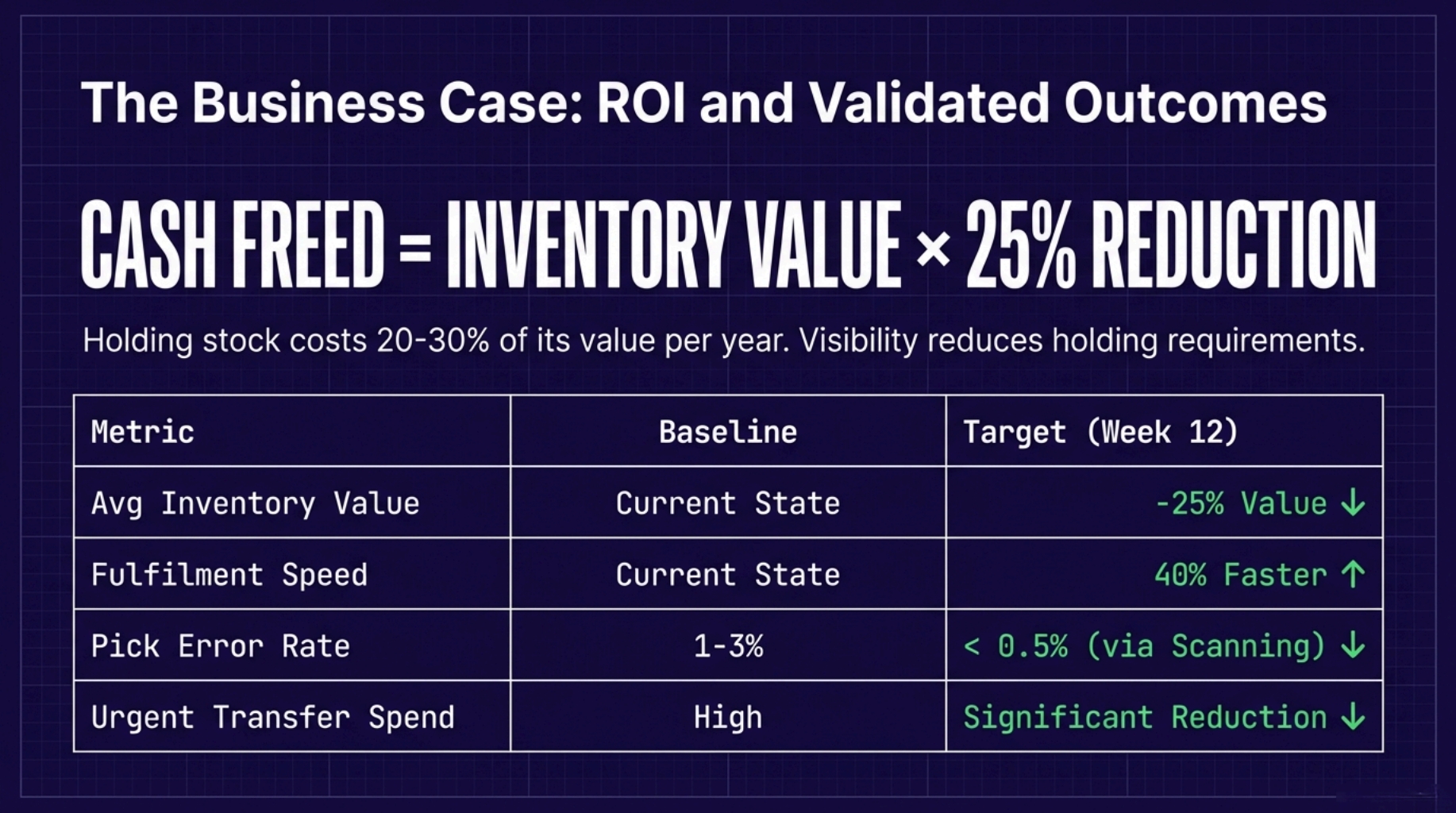
Start with this reality, holding stock costs money every day. Many sources put inventory carrying costs in the 20% to 30% range of inventory value per year, depending on your mix and storage costs. So even a small decline in average stock can free cash and cut waste.
Then add the hidden costs you feel but rarely measure, urgent transfers, split shipments, pick mistakes, and credit notes.
Simple ROI model with target outcomes
Keep it simple, so people actually use it. Use your current baseline, then add targets like 25% lower average inventory and 40% faster fulfilment as your “goal line,” then track actuals after rollout.
Inputs (what you measure today)
- Average inventory value ®
- Carrying cost rate (use your own, many firms use 20% to 30% as a starting point)
- Monthly urgent transfer and expedite spend ®
- Monthly credits and returns linked to picking or dispatch errors ®
- Rework time (hours) for re-picks, relabels, and disputes
Outputs (what you expect to improve)
- Cash freed: Inventory value × 25% (target)
- Carrying cost saved: Cash freed × carrying cost rate
- Fewer errors: manual picking can run at 1% to 3% error, scanning is often cited at below 0.5% in practice
- Fewer split shipments: fewer touches, fewer “where is it?” calls
- Faster dispatch: target 40% faster from order release to ship confirmation
Visual suggestion: a one-page table with Baseline, Target, Actual (Week 4, Week 8, Week 12).
Mini case study template (use your own numbers)
Keep it short and specific. One page is enough.
- Before: what broke most, wrong stock promises, urgent transfers, messy month-end
- Change: location tracking, transfer controls, scanning, reorder points per warehouse
- After: 3 proof points (stock level, dispatch speed, error rate)
- Quote 1 (warehouse lead): “What changed on the floor?”
- Quote 2 (finance): “What changed in cash and reconciliation?”
Wrapping Up
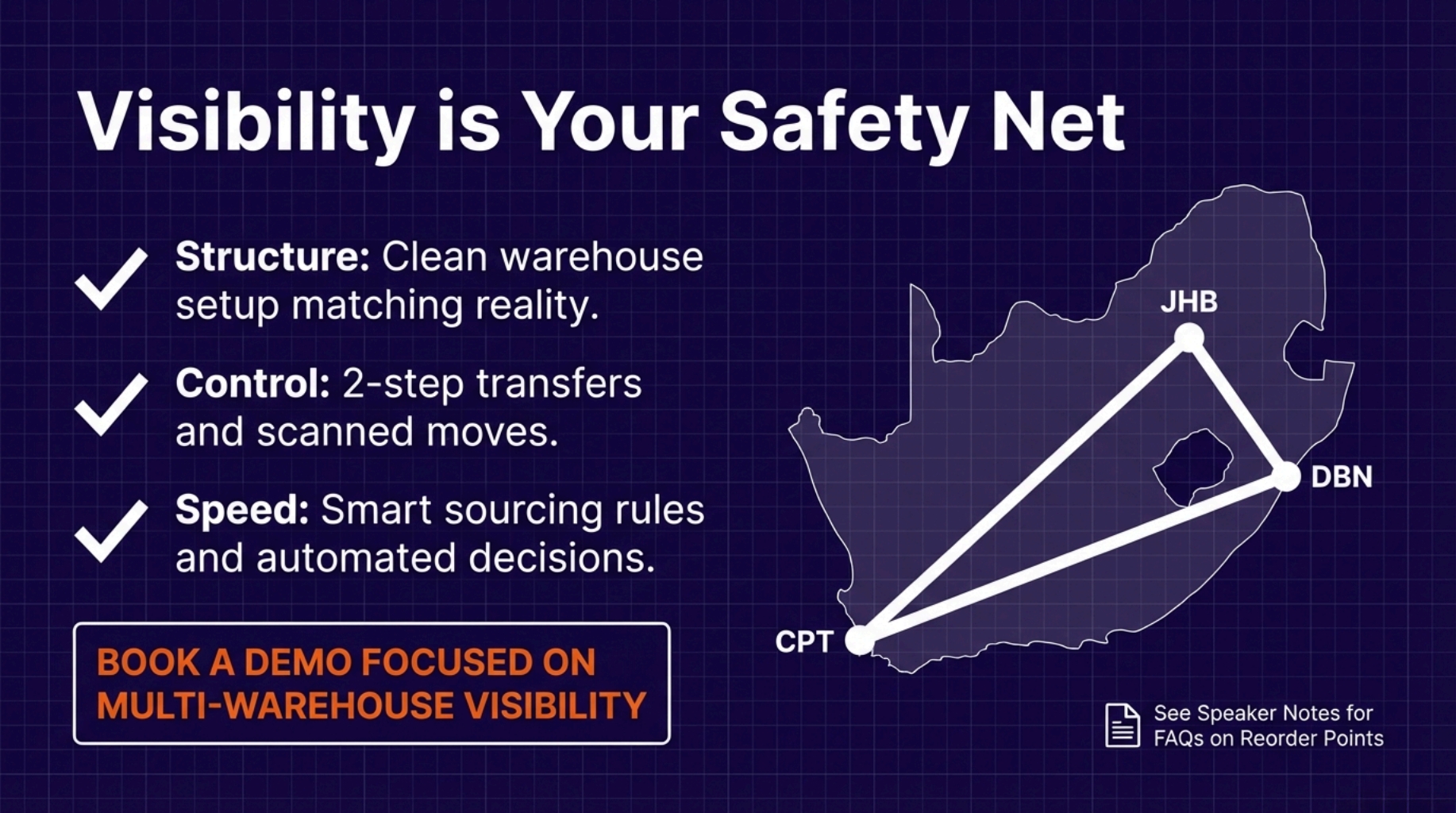
Once you pass two warehouses, visibility stops being a “nice extra.” It becomes your safety net.
If you want a fast start, do this in order:
- Clean warehouse structure and locations
- Lock down transfers and in-transit control
- Add scanning where errors hurt most
- Set reorder points per site and review weekly
If you want help building your rollout plan and ROI, book a demo focused on multi-warehouse visibility, transfers, and WMS. Multi-warehouse inventory visibility ERP South Africa should feel routine, not like a daily scramble.
FAQs
These are the questions teams ask most during planning and rollout. Each answer is short and direct so it can win featured snippets. Use them to guide internal discussions and to set expectations with users. Add your own process notes where needed. Keep the language consistent across ops and finance.
-
What is multi-warehouse inventory visibility?
It is the ability to see stock across all warehouses in one view, including on-hand, available, allocated, in-transit, and backordered. -
How do I stop branches from “fighting” over the same stock?
Use shared status definitions, enforce allocation rules, and set sourcing priorities so orders pull from the right location. -
Should we use 1-step or 2-step transfers?
Use 1-step when risk is low and speed is the main goal. Use 2-step when you need receiving confirmation and tighter controls. -
How do reorder points work across multiple warehouses?
Set min-max and safety stock per warehouse based on local demand and lead times, then review after the first planning cycles. -
Do we need barcode scanning to get accurate visibility?
You can start without it, but scanning makes data far more reliable because it removes manual entry and confirms each move.