




Summary
IoT ERP integration connects sensor alerts directly to an ERP’s service workflows, so faults instantly create enriched work orders, dispatch the right technician, reserve parts, and close the loop with automatic billing and asset updates.
This reduces downtime, cuts manual admin, improves first-time fix rates, and creates a single source of truth for maintenance, finance, and customer reporting. Start small (one asset/type), use middleware to enrich events, and scale, many organisations see ROI within months.
Key points
- Problem: Manual ticketing causes delays, transcription errors, missed alerts and hidden costs (downtime, degraded equipment life, wasted skilled labour).
- Architecture: Three layers, sensor/edge capture, middleware for enrichment and business rules, ERP workflow execution (ticket creation, assignment, parts reservation, billing).
- Benefits: Faster response (alerts → assigned technician in minutes), predictive maintenance, accurate cost visibility, higher technician productivity, better customer experience.
- Implementation tips: Begin with one critical asset and an MVP (4–6 weeks), use webhooks/REST APIs and middleware (Flowgear, SAAS Integrator, ESB), validate with field users, then expand (3–6 months full deployment).
- Vendor note: Modern ERPs like Acumatica offer native IoT-friendly APIs, workflow engines and mobile apps that simplify integrations and accelerate ROI.
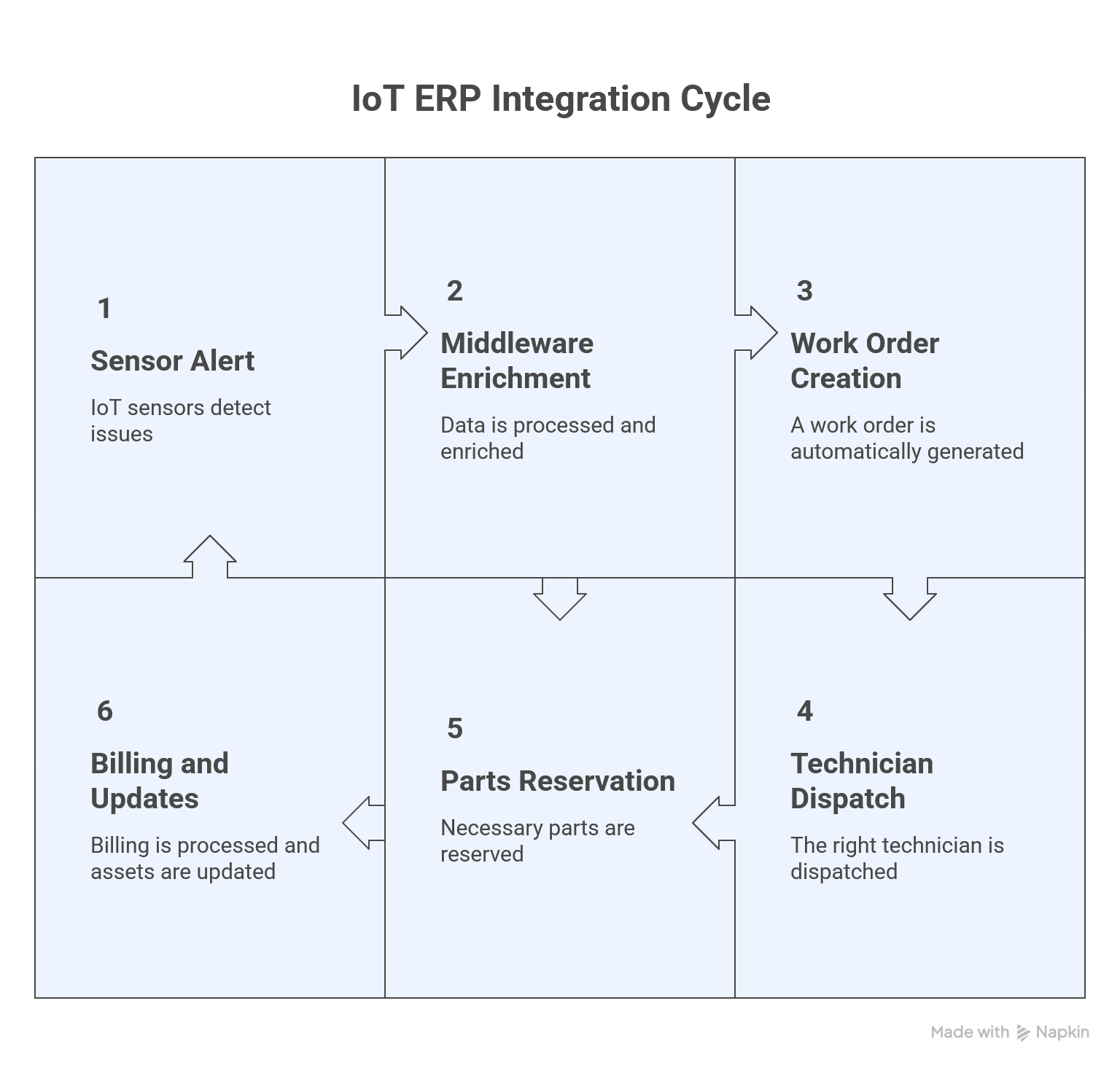
Equipment doesn't warn you politely before it breaks. Solar inverters fail. HVAC systems overheat. Production lines grind to a halt. By the time a human spots the problem, downtime costs are already mounting.
Smart companies skip the wait. They connect IoT sensors straight to their ERP system and let the alerts create work orders automatically. The right technician gets dispatched within minutes. The repair closes back to the asset record and customer report without anyone copying data between systems. This architecture turns reactive firefighting into proactive service delivery.
When a German automotive manufacturer integrated IoT sensors with their ERP platform, they saw productivity jump 18% and downtime drop 25% in just three months. That's the power of automation, machines talking directly to your service team, cutting out the delays that cost you money every single day.
Why Manual Ticket Creation Kills Efficiency
Every minute spent copying inverter fault codes into a spreadsheet or emailing maintenance requests is wasted time. Manual ticket creation introduces delays, transcription errors, and missed alerts that stack up fast.
When a solar inverter trips offline at midnight, no one sees the dashboard until morning. By then, production losses have piled up and customers start ringing. Traditional workflows force operators to check monitoring platforms, interpret alarms, decide who should respond, then create a ticket in a separate system.
This process takes 15 to 45 minutes per event, and critical issues often slip through the cracks during shift changes or busy periods.
The real kicker? Your technical staff waste hours on admin work instead of fixing equipment. Studies show automated ticket systems reduce resolution time by up to 20% and slash manual processing overhead significantly. That's time and money left on the table every day you stick with manual processes.
Hidden Costs of Delayed Response
Delayed response doesn't just extend downtime, it compounds costs across the entire operation. A single hour of inverter failure can cost a solar farm thousand in lost generation. Equipment running in fault mode degrades faster, shortening lifespan and pushing replacement costs higher.
Customer trust erodes when service teams arrive late or unprepared. Manual workflows waste expensive technical talent on administrative tasks instead of skilled repairs.
One aerospace manufacturer discovered that predictive IoT maintenance cut their costs by 25% and extended engine life by 15%. Every delayed response chips away at those potential savings and leaves performance on the table.
The Data Disconnect Problem
When IoT platforms and ERP systems don't talk to each other, critical data gets trapped in silos. Technicians arrive onsite without fault histories. Asset managers can't see real-time equipment health in their dashboards. Customer reports require manual assembly from three different systems.
Finance teams struggle to reconcile service costs against asset performance. This disconnect forces teams to duplicate data entry, creating opportunities for errors and version conflicts that frustrate everyone involved.
Integrated systems eliminate these gaps by pushing sensor readings, alarm details, and resolution notes into a single source of truth that every department can access instantly. No more chasing down information across multiple platforms or wondering which version is current.
Architecture for IoT-to-ERP Service Automation
Building a sensor-to-ticket pipeline requires three layers working together: IoT capture, middleware translation, and ERP execution. At the edge, sensors and controllers monitor equipment parameters, temperature, voltage, vibration, or fault codes.
When values cross preset thresholds, the device publishes an event to a data platform or SCADA system.
Middleware (API gateways, integration platforms, or custom connectors) receives these events, enriches them with context, asset ID, location, service history, and formats them into ERP-compatible messages.
The ERP system receives the payload and triggers automated workflows: create a service ticket, assign it based on technician skills and location, reserve parts from inventory, and notify the customer.
This three-tier model ensures alerts reach the right people with the right information in real time. By August 2025, Gartner projects that over 75% of manufacturing ERP systems will natively support IoT data streams, making this architecture the industry standard rather than an experimental edge.
Companies that integrate now position themselves ahead of competitors still running manual processes.
Sensor Layer and Alert Generation
The sensor layer captures physical conditions and converts them into digital signals. Solar inverters report fault codes when DC voltage drops or grid frequency drifts.
HVAC controllers send alerts when refrigerant pressure falls outside safe ranges. Industrial machines monitor vibration signatures and temperature curves to detect bearing wear before failure.
These devices use protocols like Modbus, MQTT, or OPC-UA to publish data to edge gateways or cloud platforms. Alarm logic can live in the device itself or in the monitoring platform, evaluating real-time streams against threshold rules and triggering events only when conditions warrant human attention.
Think of it like a smoke detector, it monitors constantly but only sounds the alarm when it detects actual danger, not every time you cook dinner.
Middleware and Data Enrichment
Raw sensor events lack the context ERP systems need to route and prioritise work. A temperature alert means nothing without knowing which asset overheated, where it sits, who owns it, and whether it's still under warranty.
Middleware platforms enrich alarm messages with asset details, customer contracts, service-level agreements, and technician availability. Integration tools like Flowgear, Saas Integrator, or enterprise service buses receive incoming events, query the ERP for related records, apply business rules, and format structured payloads.
For example, an inverter fault event becomes a work order request containing asset serial number, site address, warranty status, preferred vendor, and required parts, everything dispatch needs to act immediately without manual lookup.
One global enterprise using Relevant Software's platform cut diagnostic time dramatically by enabling remote monitoring with real-time devise health tracking and automated software rollouts.
ERP Workflow Execution
Once the enriched payload arrives, the ERP orchestrates the service lifecycle. Acumatica's workflow engine creates a field service ticket, assigns priority based on customer SLA, and routes it to the technician with matching skills and proximity.
The system reserves replacement parts from inventory, updates the asset maintenance log, and sends automated notifications to the customer and field team. As the technician updates the ticket, travel time, diagnosis, parts used, resolution notes, the ERP captures labour costs, inventory movements, and asset history in real time.
When closed, the ticket triggers billing, updates asset health scores, and generates a customer report without manual intervention. Manufacturers implementing this level of automation report ROI within 12 to 18 months, according to Siemens case studies. The system pays for itself whilst your team focuses on fixing equipment instead of pushing paper.
Real-World Implementation: Solar Inverter Monitoring
Consider a solar O&M provider managing 50 sites across multiple states. Each site has 10 to 30 inverters reporting status every five minutes to an SCADA platform. When an inverter fault occurs, say, a grid overvoltage event or a failed DC string, the SCADA system publishes an alarm via webhook to an integration platform.
The middleware queries Acumatica for the asset record matching the inverter serial number, retrieves the customer contract, and checks technician availability within a 50-mile radius. It then posts a new field service case to Acumatica with all relevant details: fault code, site coordinates, customer contact, warranty expiration, and recommended parts.
Acumatica's scheduler assigns the case to the nearest qualified technician, reserves a replacement fuse from the regional warehouse, and emails both the customer and the tech with estimated arrival time. The tech receives the case on a mobile device, reviews historical service notes, and drives to the site fully prepared.
After replacing the fuse and verifying inverter restart, the tech closes the case from the field. Acumatica automatically updates asset runtime hours, posts parts and labour costs, generates an invoice, and emails a service summary to the customer, all without the O&M coordinator touching a keyboard.
This isn't science fiction. It's happening right now across industries that depend on uptime for revenue.
Alert to Assignment in Under 5 Minutes
Speed matters when revenue-generating assets go offline. In this scenario, the time from inverter fault to technician notification drops from 30+ minutes to under five. The SCADA webhook fires within seconds of the fault. Middleware enrichment and ERP posting complete in another 10 to 20 seconds.
Acumatica's scheduling rules evaluate tech availability and location, assigning the case in real time. The assigned technician receives a push notification with GPS coordinates, fault details, and customer notes before the inverter has been offline for five minutes.
This rapid response minimises generation loss and demonstrates proactive service to customers, strengthening retention and enabling premium service contracts. When customers see your tech arriving before they've finished their morning coffee, they notice. That's the kind of service that turns contract renewals into no-brainer decisions.
Closing the Loop: Asset and Customer Reports
The final piece of the automation loop is documentation. When the technician marks the case resolved, Acumatica records every detail: arrival time, diagnosis, parts consumed, labour hours, and root cause notes.
These updates flow into the asset maintenance history, building a comprehensive service record for predictive analysis. The system calculates total case cost, parts at inventory price, labour at tech rate, and travel expense, and generates an invoice if billable.
It also compiles a customer-facing service report showing the fault, corrective action, and recommendations for future prevention. All documents link back to the asset record, enabling managers to track mean time between failures, maintenance costs per asset, and technician performance without exporting data to spreadsheets.
With IoT-enabled delivery tracking and asset monitoring, businesses can inform customers about service status in real time, elevating the customer experience whilst optimising operational efficiency. Your clients get transparency. Your team gets actionable intelligence. Everyone wins.
Benefits Beyond Speed
Automation delivers more than faster response. It unlocks predictive capabilities, financial visibility, and workforce optimisation that manual processes can't match.
With every alert and resolution logged automatically, ERP systems accumulate rich datasets for trend analysis. Maintenance teams identify recurring failure patterns, like specific inverter models that overheat in summer, and schedule proactive replacements before faults occur.
Acumatica's AI Studio takes this further, using machine learning to spot patterns humans miss and recommend preventive actions before equipment enters failure modes.
Finance teams gain real-time visibility into service costs per asset, enabling accurate budgeting and contract pricing. When you know exactly what each piece of equipment costs to maintain, parts, labour, travel time, you can price service contracts that actually make money instead of guessing and hoping.
Technicians spend less time on paperwork and travel, completing more jobs per day with higher first-time fix rates because they arrive with the right parts and information.
Acumatica's enhanced mobile experience means field workers can access full asset histories, update tickets, and capture photos from their smartphones without wrestling with clunky interfaces.
Customers see faster resolution, proactive communication, and detailed service histories that build confidence and loyalty. The redesigned customer portal in Acumatica 2025 R2 lets clients track service status in real time, view past maintenance records, and manage support cases without ringing your office.
Over time, these benefits compound: equipment lasts longer, service contracts become more profitable, and the organisation scales service capacity without proportional headcount growth.
That's the difference between automation that just speeds things up and automation that fundamentally transforms how your business operates.
Getting Started with Your Integration
Building your first sensor-to-ticket pipeline doesn't require a massive IT project. Start with a single asset type and one critical alert. Choose equipment where downtime has clear financial impact, like inverters, chillers, or production lines.
Work with your IoT vendor or SCADA provider to expose a webhook or API endpoint for alarm events. Acumatica's enhanced web services in the 2025 R2 release provide improved REST API support for workflow actions, making these connections simpler to establish and maintain.
Select a middleware tool that matches your team's skill level: no-code platforms like Flowgear for simple workflows, or more powerful options like n8n for complex logic. Acumatica integrates with emerging IoT technologies through native connections, reducing the middleware complexity that plagues older ERP systems.
Map the data fields from your IoT platform to your ERP's service ticket structure, asset ID, location, fault code, priority. Build a proof-of-concept integration that creates test tickets from simulated alarms.
Validate the workflow with your field team: do tickets contain the right information? Are assignments routing correctly? Does the mobile experience work onsite?
Acumatica's improved mobile interface with visual attachment tiles and optimised performance makes field validation straightforward.
Refine the rules, then expand to additional alert types and asset classes. Document your integration patterns and train your team on monitoring and troubleshooting.
Most organisations achieve a working prototype within 4 to 6 weeks and scale to full deployment in 3 to 6 months.
The key is starting small and proving value before expanding. One successful integration that saves your team hours per week builds momentum for broader automation initiatives.
Don't try to automate everything on day one, pick the alert that costs you the most money when it's ignored, fix that first, then build from there.
Why Acumatica Leads the IoT Maintenance Revolution
Acumatica isn't just another ERP that claims to handle IoT data, it's built from the ground up to make sensor-to-service automation actually work in the real world.
Whilst legacy systems require expensive customisation and bolt-on middleware just to accept basic sensor feeds, Acumatica's cloud-native architecture connects seamlessly with various IoT platforms through native API support and robust web services.
The platform's workflow engine doesn't just create tickets, it orchestrates the entire service lifecycle with automated assignment rules, inventory reservation, mobile technician access, and closed-loop documentation that flows back into asset histories and customer reports.
This means your team spends time fixing equipment instead of fighting software. One manufacturing client integrated Acumatica with shop floor sensors and saw productivity climb 18% whilst cutting downtime by a quarter in just three months.
What sets Acumatica apart is its flexible deployment model and unique licensing structure. You're not charged per user, so field technicians, warehouse staff, and service coordinators can all access real-time data without driving costs through the roof.
Whether you need cloud, on-premise, or hybrid deployment, Acumatica adapts to your infrastructure rather than forcing you into a one-size-fits-all box.
Native Integration Without the Middleware Nightmare
Whilst other ERP systems force you to buy third-party integration platforms and hire specialists to build custom connectors, Acumatica's web services architecture accepts data from IoT platforms, SCADA systems, and edge devices directly.
The platform supports standard protocols and offers pre-built connectors for common industrial monitoring systems, cutting implementation time from months to weeks.
Acumatica's monitoring and automation engine tracks integration health, alerts you to connection issues before they cause data gaps, and provides dashboards showing real-time data flow from sensors through the closed work orders.
This visibility means your IT team isn't blindly troubleshooting when something goes wrong, they can pinpoint the exact integration point causing problems.
The system also handles bidirectional data sync, so updates from field technicians on mobile devices flow back through the ERP to IoT dashboards and customer portals automatically.
This eliminates the version control nightmares that plague disconnected systems, where nobody knows which screen shows the current equipment status.
Scalability That Grows With Your Asset Network
Small operations managing a dozen pieces of equipment face different challenges than enterprises monitoring thousands of assets across multiple continents.
Acumatica scales effortlessly because its cloud-native architecture distributes processing load automatically as your sensor network expands.
The platform's flexible licensing model means adding sensors, sites, or field technicians doesn't trigger surprise cost increases that force awkward budget conversations.
You pay for resources consumed, database size, API calls, storage, not arbitrary user counts that penalise companies for giving staff the tools they need.
Acumatica's industry-specific solutions for manufacturing, distribution, and field service come pre-configured with asset management workflows, maintenance scheduling templates, and reporting dashboards that reflect best practices from thousands of implementations.
This means you're not starting from scratch, you're building on proven patterns that already work for companies in your industry facing similar challenges.
Wrapping Up
Connecting IoT alerts directly to ERP service workflows transforms maintenance from reactive scrambling to proactive orchestration.
By eliminating manual ticket creation, enriching alerts with asset context, and automating technician assignment, organisations cut response times, reduce downtime costs, and build comprehensive service histories that drive predictive improvements.
Whether monitoring solar inverters, HVAC systems, or industrial equipment, the architecture remains consistent: sensors detect, middleware enriches, and ERP executes. Start small, prove value with one critical asset type, and scale from there.
The result is faster service, happier customers, and a maintenance operation ready for growth. With Acumatica's 2025 R2 release bringing AI-powered automation, enhanced mobile capabilities, and improved API connectivity, there's never been a better time to connect your sensors to your service workflows.
Ready to eliminate manual work orders? Explore how Astraia and Acumatica's field service and IoT integration capabilities can automate your sensor-to-ticket workflows and transform your maintenance operations.
FAQ Section
Q: What types of IoT sensors can trigger automated service tickets in ERP?
A: Most industrial sensors and controllers that support standard protocols (MQTT, OPC-UA, Modbus, HTTP webhooks) can integrate with ERP systems. Common examples include solar inverters, HVAC controllers, vibration sensors, temperature probes, and production line PLCs.
Q: How long does it take to set up an IoT-to-ERP service ticket integration?
A: A proof-of-concept for a single alert type typically takes 4 to 6 weeks. Full-scale deployment across multiple asset types and sites usually completes within 3 to 6 months, depending on system complexity and team readiness.
Q: Can automate ticket creation work with existing SCADA or monitoring platforms?
A: Yes. Most modern SCADA and IoT platforms offer API endpoints or webhook capabilities that allow external systems to subscribe to alarm events. Middleware tools translate these events into ERP-compatible formats without replacing your current monitoring infrastructure.
Q: How does the ERP determine which technician to assign to an automated ticket?
A: ERP systems use configurable assignment rules based on criteria like technician skills, certifications, current workload, geographic proximity to the asset, and customer contract requirements. Advanced systems also consider availability calendars and shift schedules for optimal routing.
Q: What happens if a sensor sends a false alarm or duplicate alert?
A: Middleware layers can implement deduplication logic, threshold filtering, and validation rules before creating ERP tickets. Many integrations also support acknowledgment flows, where operators can review alerts in a staging queue before committing them to formal work orders.