




Summary
This playbook shows HVAC and solar service teams how to cut costly repeat service visits by improving first-time fix rates using data-driven practices in Acumatica ERP. Focus on three drivers, right parts (fault-based kits), right skills (targeted training from real ticket history), and right information (service history, checklists, and a searchable knowledge base). Connect kits, training, checklists and ERP reporting creating a closed-loop workflow that rises first-time fix rates, reduces callbacks, and boosts profitability.
Key points
- Problem and impact: Repeat visits are expensive (2–3x cost), hurt customer satisfaction, and signal system failures (wrong parts, poor training, missing job context). Top performers hit ~88% first-time fix, vs. the industry average ~75–78%.
- Three drivers of success: right parts (fault-based, pre-stocked kits), right skills (assign qualified techs and train on real ticket failures), right information (complete service history, checklists, and knowledge base).
- Kit strategy: Analyse 12 months of work orders in Acumatica to identify top failing parts by equipment type; build BOM-based kits, set min/max levels, automate replenishment, and audit seasonally.
- Training from real tickets: Use escalated and multi-visit tickets as scenario-based training material; track training completion and changes in individual first-time fix rates.
- Operational tools: Use Acumatica for checklists, document attachments (photos, wiring diagrams), tagging “golden tickets,” and mobile access, so techs leave warehouse fully prepared.
- Metrics and continuous improvement: Track first-time fix rate (overall and by technician/equipment), callback reason codes, and cost per callback on dashboards; use data to target kits, training, and process fixes.
- Closed-loop workflow: Dispatch suggests the best tech and kit, tech follows checklist and knowledge base, parts usage updates inventory and feeds back into kit design and training, creating repeatable improvements.
Actionable starter steps
- Export last 90–12 months of completed work orders from Acumatica and identify top parts/failure patterns.
- Build 2–3 fault-based kits for the most common service types and set automated replenishment rules.
- Create checklist templates and one scenario-based training module from real tickets; assign to relevant techs.
- Establish a first-time fix baseline metric and review progress monthly.
Repeat service visits drain profit, frustrate customers, and waste technician time. It’s not just annoying, it’s expensive. Top-performing HVAC and solar companies achieve first-time fix rates above 80% by equipping techs with the right parts, skills, and information before they leave the warehouse.
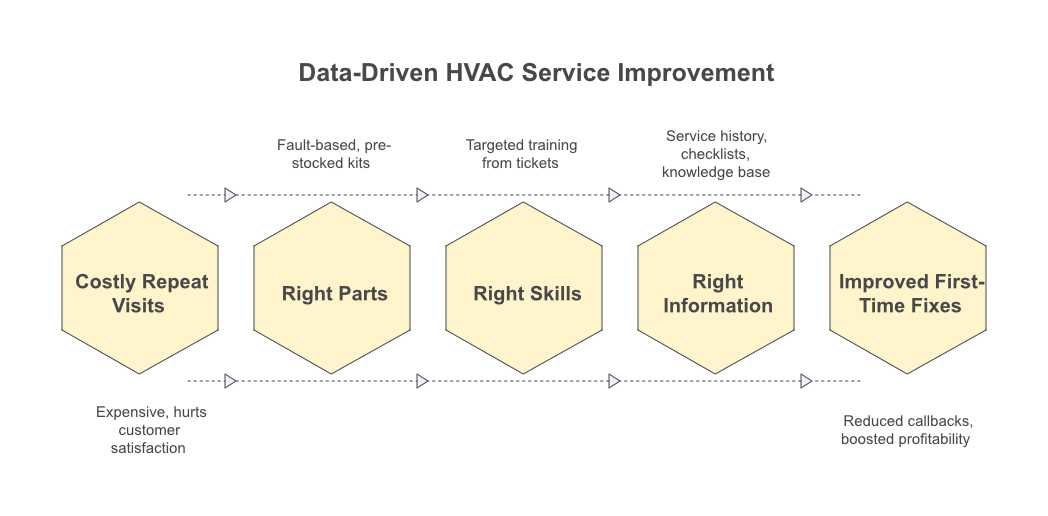
Repeat service visits drain profit, frustrate customers, and waste technician time. It’s not just annoying, it’s expensive. Top-performing HVAC and solar companies achieve first-time fix rates above 80% by equipping techs with the right parts, skills, and information before they leave the warehouse.
This playbook shows you how to build fault-based service kits, train from real ticket history, and track the three critical drivers of first-visit success, all inside Acumatica ERP.
Think about it: every callback means you’re sending a truck, a tech, and parts to the same address twice. You’re paying for gas, labour, and lost time while another customer waits. Meanwhile, your customer is thinking about calling someone else next time. The fix isn’t complicated, it’s about having the right system in place.
The secret? Stop guessing what techs need and start using data to eliminate callbacks. When you connect your work order history to your inventory, training programs, and mobile tools, first-time fix stops being a goal and becomes your new standard.
Why First-Time Fix Is Important for HVAC and Solar Companies
A low first-time fix rate signals deeper problems: poor inventory planning, inadequate training, or missing job context. Industry benchmarks show the average field service company hits 75% first-time fix, while best-in-class teams reach 88%.
Every repeat visit eats into margins, delays other jobs, and damages customer trust. For HVAC and solar teams operating on tight service agreements, fixing it right the first time is the difference between profit and loss.
Here’s the reality: repeat visits cost 2-3x more than planned service calls due to travel, scheduling, and lost productivity. You’re not just paying for the second trip, you’re losing the revenue from the job your tech could have been doing instead.
Customer satisfaction drops sharply when techs can’t resolve issues on the first visit. People take time off work to let you in. When you have to come back, they remember.
The numbers tell the story. The top 20% of companies achieve 88% first-time fix rates, compared to the industry average of 75%. Aberdeen Group research shows top performers hit an 88% first-time fix rate, while the bottom 30% struggle below 70%. The average first-time fix rate for mobile service providers sits at 77.8%. Where does your team fall on that scale?
Low first-time fix signals systemic issues: wrong parts, under-trained techs, or incomplete job information. It’s rarely the technician’s fault, it’s usually a system failure. The good news? Systems can be fixed.
The Three Drivers of First-Time Fix
Fixing jobs on the first visit requires three things working together: the right parts in the van, the right skills in the technician, and the right information before dispatch.
Miss anyone, and your tech returns empty-handed. HVAC and solar service teams that master this triangle see dramatic improvements in completion rates, often jumping from 70% to 90% + within months.
Right Parts means fault-based kits pre-stocked based on equipment type and common failure modes. Your tech shouldn’t be guessing which capacitor to bring or calling the warehouse from a customer’s driveway. The parts should already be in the van because you know what typically fails on that equipment model.
Right Skills means technician assignment matching job complexity and certification requirements. Don’t send a junior tech to troubleshoot a complex heat pump issue or a senior tech to change a filter. Match skill to task, and your first-time fix rate climbs immediately.
Right Information means complete service history, equipment specs, and customer notes available for dispatch. When did you last service this unit? What parts were replaced? Did the customer mention strange noises or smells? All of that context turns guesswork into preparation.
Acumatica ERP gives you the tools to control all three drivers from one platform. Integration of all three factors in a single ERP system eliminates handoffs and data gaps.
No more calling the office for history, checking three systems for parts availability, or wondering if your tech has the right training. Everything connects, and a first-time fix becomes repeatable instead of lucky.
Building Fault-Based Service Kits
Generic service kits waste space and money. Fault-based kits group parts by equipment type and the most common failures techs encounter in the field.
Instead of carrying everything or guessing what you need, you build kits from actual work order history: which parts failed on Carrier condensers, what breaks on Trane heat pumps, or which inverter components fail most on solar arrays.
Acumatica’s inventory and work order modules let you analyse failure patterns and auto-generate kit lists tied to specific service types.
Here’s how one HVAC company did it: they pulled a year of completed tickets and noticed capacitor failures showed up in 68% of AC service calls during the summer. Contactors? Another 52%.
They built a “Summer AC Kit” with the top 12 parts from that data. The result? Parts-related callbacks dropped 40% after implementing fault-based kits for their top 5 equipment brands, cutting repeat visits from 28% to 17% in one season.[12]
The process is straightforward. Analyse completed work orders by equipment type to identify the top 10-15 most-used parts. Group kits by service category: AC maintenance, heating repair, solar inverter service.
Use Acumatica’s BOM (bill of materials) feature to define kit contents and auto-replenish when used. Track kit usage and success rates to refine contents over time. Assign kits to jobs at dispatch so techs load the right box before leaving the warehouse.
How to Analyse Work Order History for Kit Design
Your work order database holds the blueprint for perfect service kits. Pull 12 months of completed tickets filtered by equipment type and fault code. Look for patterns: which parts appear in 60%+ of compressor failures, what consumables are used on every tune-up, or which solar components fail within warranty periods.
Acumatica’s reporting tools let you pivot this data by equipment brand, service type, and technician to spot exactly what belongs in each kit.[12]
Start by exporting 12 months of work orders with parts usage detail from Acumatica. Filter by equipment manufacturer, model, and fault description. Identify parts appearing in 50% + of service tickets for that equipment type.
Cross-reference with technician notes to catch undocumented part swaps, sometimes techs use a different part than what’s officially logged. Update kit BOMs quarterly as failure patterns shift with equipment age. A five-year-old heat pump fails differently than a fifteen-year-old one.
Managing Kit Inventory and Replenishment
Kits only work if they stay stocked. Set min/max levels in Acumatica for each kit BOM item, tied to weekly service volume. When techs close jobs and consume kit parts, the system flags low stock and triggers reorders automatically. This eliminates the “empty bin” problem where kits exist on paper but sit incomplete in the warehouse.
Define minimum/maximum stock levels based on average weekly kit consumption. Enable automated purchase requisitions when kit components hit reorder points. Require techs to scan or check off kit usage at job completion for accurate tracking. Monthly kit audits catch expired, damaged, or superseded parts.
Seasonal kit adjustments matter too, heating vs. cooling demand shifts mean different parts move at different times of the year. Assign ownership: one person audits kits weekly, refills empties, and retires outdated items as equipment generations change.
Training Technicians from Real Ticket Data
The best training material is hidden in your closed work orders. Pull tickets where jobs took multiple visits or required escalation to senior techs. These real-world failures show exactly where skills gaps exist: missed diagnostics, incorrect part selection, or incomplete repairs.
Build training modules around these actual scenarios instead of generic HVAC theory. Acumatica captures complete ticket history, technician notes, and resolution steps, giving you a library of teachable moments tied to your actual equipment base and customer mix.
One solar service team found that 35% of inverter callbacks involved one specific error code. They built a 20-minute training video from actual tickets showing proper diagnostic steps. Callbacks of that fault dropped to 8% within two months. That’s the power of training from real data instead of textbooks.
Identify repeat visits and escalated tickets from Acumatica work order reports. Extract technician notes, fault codes, and resolution steps from these problem jobs. Create scenario-based training: “What would you do differently?” case reviews. Pair junior techs with senior techs on equipment types where callbacks are highest.
Track training completion and measure first-time fix improvement by technician over 90 days. Set measurable goals by tying learning outcomes to KPIs like first-time fix rate, average job duration, and customer satisfaction scores.
Identifying Skill Gaps from Callback Patterns
Callbacks aren’t random, they cluster around specific skills, equipment, or technicians. Run Acumatica reports showing repeat visits by technician, equipment category, and fault type.
If one tech struggles with heat pump diagnostics or another can’t close solar panel voltage issues, the data illustrates can’t close solar panel voltage issues. Use this insight to assign targeted training, not blanket refreshers that waste everyone’s time.
Generate monthly callback reports grouped by technician and equipment type. Compare individual first-time fix rates against team averages. Flag techs with greater than 25% repeat rate on specific equipment categories.
Schedule mentoring or certification courses for identified gaps. Re-measure first-time fix rate 60 days post-training to confirm improvement. If the numbers don’t move, the training didn’t work, try a different approach.
Building a Knowledge Base Inside Acumatica
Every tricky job your team solves should become searchable knowledge for the next tech facing the same issue. Acumatica’s document management and notes fields let you attach photos, wiring diagrams, and step-by-step fixes directly to work orders.
Tag these entries by equipment model and fault code, so techs can search before heading to a job. Over time, you build an internal wiki written in your team’s language, covering your actual installation base, not generic manufacturer manuals.
Require techs to attach photos and notes on complex or unusual repairs. Tag work orders with equipment model, fault code, and resolution method. Enable keyword search across historical work orders before dispatch. Highlight “golden tickets”, perfect examples of difficult fixes done right.
Monthly reviews promote the best examples to formal knowledge base articles. When a tech searches “Trane heat pump error code E3” before leaving the shop, they should find three examples of how your team fixed it, complete with photos and parts lists. That’s preparation, not guesswork.
Using Checklists to Lock in First-Time Completion
Checklists eliminate guesswork and forgotten steps. Build service checklists in Acumatica tied to equipment type and service reason: AC tune-up, heat pump fault diagnosis, solar inverter replacement. Techs complete each item on mobile devices before closing the job.
This forces verification of all critical steps, refrigerant pressure, electrical connections, safety tests, that are often skipped under time pressure. Incomplete checklists flag jobs for supervisor review before they leave the field, catching mistakes before they become callbacks.
Create equipment-specific checklists covering all critical service steps. For HVAC, that means checking refrigerant levels, testing electrical connections, verifying thermostat calibration, and documenting airflow measurements.
For solar, it includes inverter health checks, cable integrity inspections, panel cleaning verification, and monitoring system connectivity. Require checklist completion before a work order can be marked “complete.” Flag incomplete checklists for supervisor review and same-day callback prevention.
Track checklist compliance by technician to identify shortcuts or rushing. If one tech consistently skips steps or marks items complete too quickly, that’s your red flag. Update checklists when callbacks reveal missed steps or new equipment requirements.
Field service companies using digital checklists report 15-25% reduction in quality-related callbacks. That’s not a slight improvement, that’s the difference between profitable growth and treading water.
Tracking the Right Metrics in Acumatica
You can’t improve what you don’t measure. Acumatica gives you real-time dashboards tracking first-time fix rate by technician, equipment type, service category, and time period. Pull weekly reports showing which jobs required repeat visits, why they failed, and what parts or skills were missing.
Share this metrics in team meetings, not as blame, but as targets for improvement. Top-performing teams review the first-time fix rate daily and address problems before they become patterns.
The first-time fix rate formula is simple: divide jobs completed on first visit by total jobs, then multiply by 100. If you closed 82 jobs on the first visit out of 100 total jobs, your first-time fix rate is 82%. Industry benchmarks show 70-80% average, with top performers hitting 88%+.
Track first-time fix rates by technician, equipment category, and service type monthly. Monitor parts-related callbacks versus skills-related callbacks separately, different problems need different solutions.
Set team goals and celebrate improvements publicly to drive engagement. Post the numbers where everyone can see them. When first-time fix rates climb, recognise the techs who made it happen. When they drop, don’t point fingers, dig into the data to find the root cause and fix it together.
Key metrics to dashboard:
- Overall first-time fix rate percentage (rolling 30/90 days)
- First-time fix rate by individual technician
- Top 5 equipment types with the lowest first-time fix rate
- Callback reason codes (parts, skills, information gaps)
- Average cost per callback
These numbers tell you exactly where to focus your improvement efforts. Low first-time fix rate on heat pumps? Build better kits or run targeted training. One tech struggling? Pair them with a mentor. Parts callbacks spiking? Audit your kit contents against recent work orders.
Putting It All Together: The First-Time-Fix Workflow
Connect kits, training, checklists, and data into one repeatable workflow. When a service call arrives, Acumatica suggests the right technician based on skills and equipment familiarity, assigns the correct fault-based kit, and surfaces relevant past tickets and knowledge base articles.
The tech loads the pre-built kit, reviews the job history on mobile, and follows the equipment-specific checklist on-site. After completion, the system captures parts used, updates kit inventory, and feeds data back into training and kit design. This closed loop continuously improves the first-time fix without extra effort.
Here’s how it works in practice. A customer calls about a Trane heat pump error code. Your dispatch system auto-assigns the tech with the highest first-time fix rate for Trane equipment. The system prompts kit selection based on service category and job details, in this case, the “Heat Pump Diagnostics Kit.”
Before leaving, the tech opens the mobile app, which displays service history (you replaced the reversing valve two years ago), checklists (verify refrigerant charge, test defrost cycle, check electrical connections), and knowledge base articles (three past tickets with similar error codes and how they were resolved).
The tech arrives, follows the checklist, finds the issue (faulty pressure sensor), replaces it with a part from the kit, and marks each checklist item complete. The moment the job closes, parts usage updates, kit inventory levels, the success gets added to that tech’s first-time fix rate, and the work order becomes searchable knowledge for the next tech who faces the same error code. Post-job data flows back to kit design, training needs, and performance tracking automatically.
Monthly workflow reviews tighten integration and eliminate manual steps. Ask: Where are techs still calling the office for information? What parts are techs grabbing outside their assigned kits? Which checklists feel too long or miss critical steps? Fix those friction points, and a first-time fix stops being a goal and becomes your default outcome.
Wrapping Up
A first-time fix isn’t luck, it’s a system. HVAC and solar teams that combine fault-based kits, real-world training, and equipment-specific checklists inside Acumatica ERP consistently hit 80% + completion rates. Start by analysing your last 90 days of work orders to identify where callbacks cluster.
Build your first three service kits around those patterns, train techs on the most common failure modes, and implement simple checklists for each equipment category.
Measure your baseline first-time fix rate today and track improvement monthly. The right parts, the right skills, and the right information, all inside one ERP, turn repeat visits into rare exceptions.
Ready to cut callbacks and boost profitability? Discover how Acumatica ERP equips HVAC and solar teams with the tools to achieve industry-leading first-time fix rates.
FAQ Section
Q1: What is a good first-time fix rate for HVAC service companies?
Industry benchmarks suggest 70-80% is average, while top-performing HVAC companies achieve 80-88% first-time fix rates. Rates below 70% indicate systemic issues with parts, training, or job information.
Q2: How do you calculate first-time fix rate?
Divide the number of jobs completed on the first visit by total jobs, then multiply by 100. For example: 78 first-visit completions ÷ 100 total jobs × 100 = 78% FTFR.
Q3: What causes most repeat service visits in HVAC and solar?
The three main causes are wrong parts (tech didn’t have the needed component), insufficient skills (tech couldn’t diagnose or repair the fault), and incomplete information (missing service history or equipment specs).
Q4: How can ERP software improve first-time fix rates?
ERP systems track service history, automate kit management, match techs to jobs based on skills, and provide mobile access to equipment data and checklists, addressing all three drivers of first-time fix simultaneously.
Q5: How often should service kits be updated?
Review and update fault-based kits quarterly based on work order data, immediately when new equipment models enter your installation base, and seasonally to adjust for heating vs. cooling service patterns.