




Summary
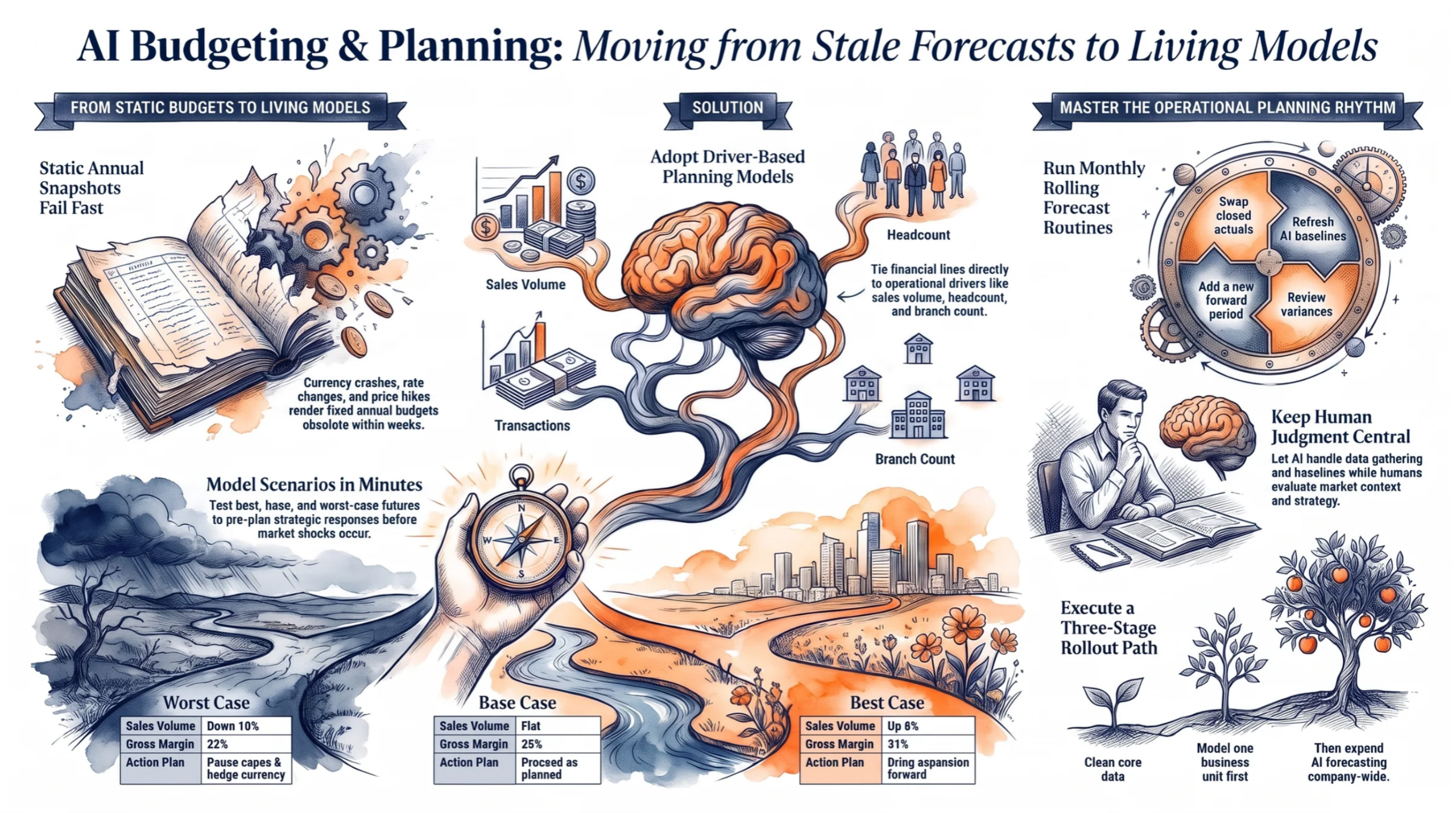
AI budgeting planning helps finance teams replace fixed annual budgets with driver-based models, rolling forecasts, and regularly updated scenarios. It reduces manual spreadsheet work, keeps plans aligned with changing conditions, and preserves human control over business decisions.
Key points
- Annual budgets become outdated quickly when exchange rates, interest rates, energy costs, fuel prices, and supply conditions change.
- Driver-based planning links financial results to business activities such as sales volume, pricing, headcount, electricity usage, and capital spending.
- AI can gather data, suggest baselines, refresh forecasts, identify variances, and model best, base, and worst-case scenarios.
- Rolling forecasts update monthly by replacing forecast periods with actual results and adding a new period ahead.
- A shared planning model, clear ownership, approval records, and human review reduce spreadsheet errors and improve accountability.
- Acumatica can connect budgets, actuals, sales, purchasing, inventory, and reporting in one cloud ERP system.
- A practical rollout starts with clean data and one business unit, then expands to AI forecasts, scenario planning, and wider departmental use.
Introduction
AI budgeting and planning gives finance teams a plan that keeps pace with the business instead of one that dies in a drawer. You know the story. Your team spent three months building the annual budget, and by March, it no longer matched reality.
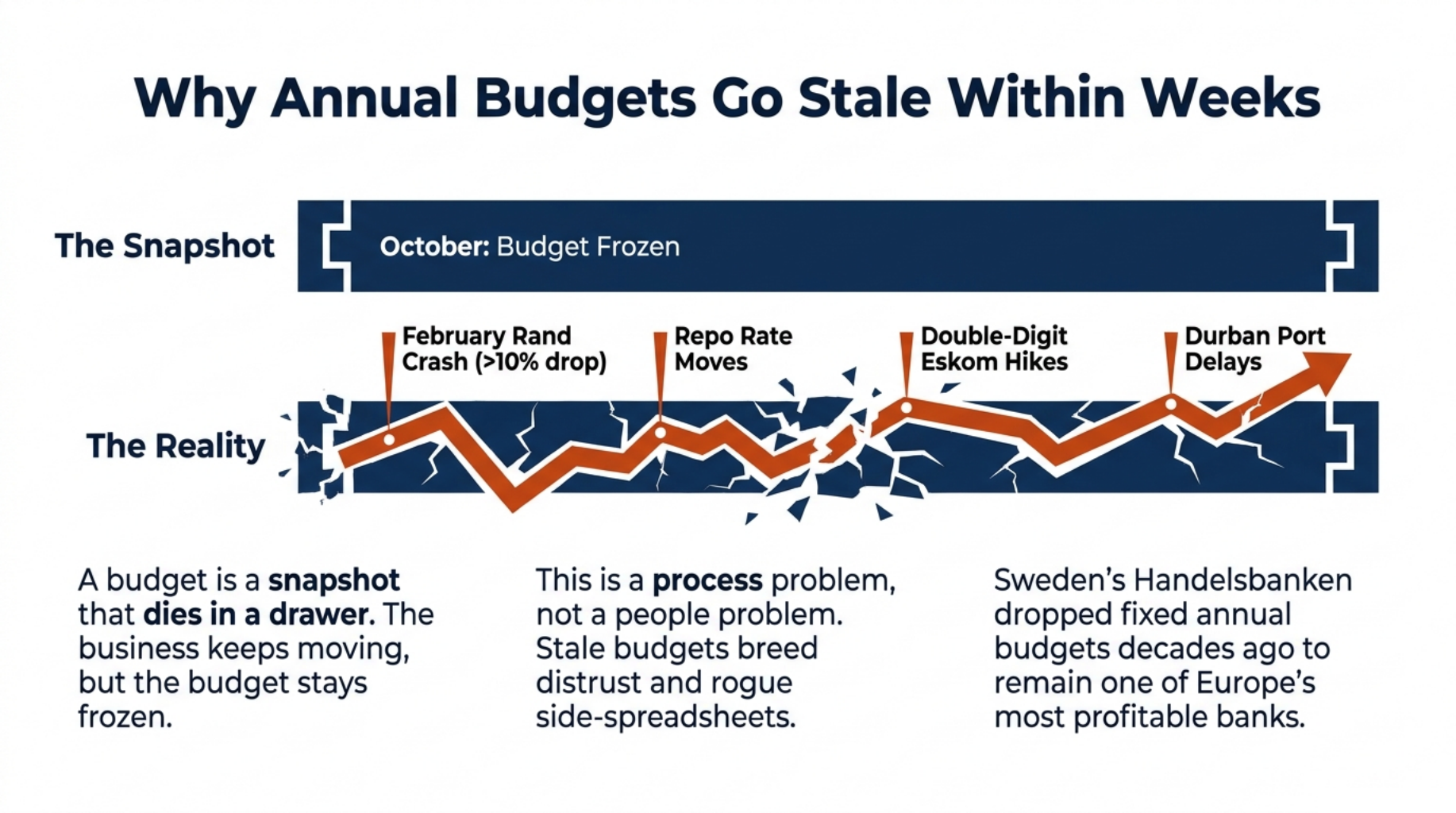
In South Africa, that gap opens fast. The rand has lost more than 10% of its value in a matter of weeks more than once, the Reserve Bank keeps moving the repo rate, and Eskom tariff hikes have run into double digits for years. A fixed budget cannot absorb shocks like these.
This guide gives you a driver-based planning template, a scenario model with best, base, and worst cases, and a rolling forecast checklist you can start using this month.
Why Annual Budgets Go Stale Within Weeks
A budget built in October cannot predict a February rand crash.
An annual budget goes stale because it is a snapshot. It captures your best guesses on one day, often months before the financial year starts. The business keeps moving after that day, but the budget stays frozen.
In a single year, the fuel price changes every month, the repo rate moves, power costs climb, and port delays in Durban hold up stock. Each shift hits a large cost or price line, and every number linked to that line goes wrong with it.
This is a process problem, not a people problem. Sweden’s Handelsbanken dropped fixed annual budgets decades ago and has stayed one of Europe’s most profitable banks. In most companies, though, a stale budget breeds distrust, and managers start keeping their own side spreadsheets.
The Hidden Cost of Manual Planning Cycles
Manual planning cycles eat more time than most leaders realise. Finance sends templates to every department, then spends weeks chasing replies by email. Files come back with broken links and outdated versions.
Take a Johannesburg manufacturer with eight departments. If each one needs three rounds of follow up, finance works through 24 email threads before it checks a single number. By the time the data is clean, the team has spent its energy gathering figures instead of analysing them.
That leads to the real question: what would change if a machine handled the gathering?
How AI Budgeting and Planning Changes the Process
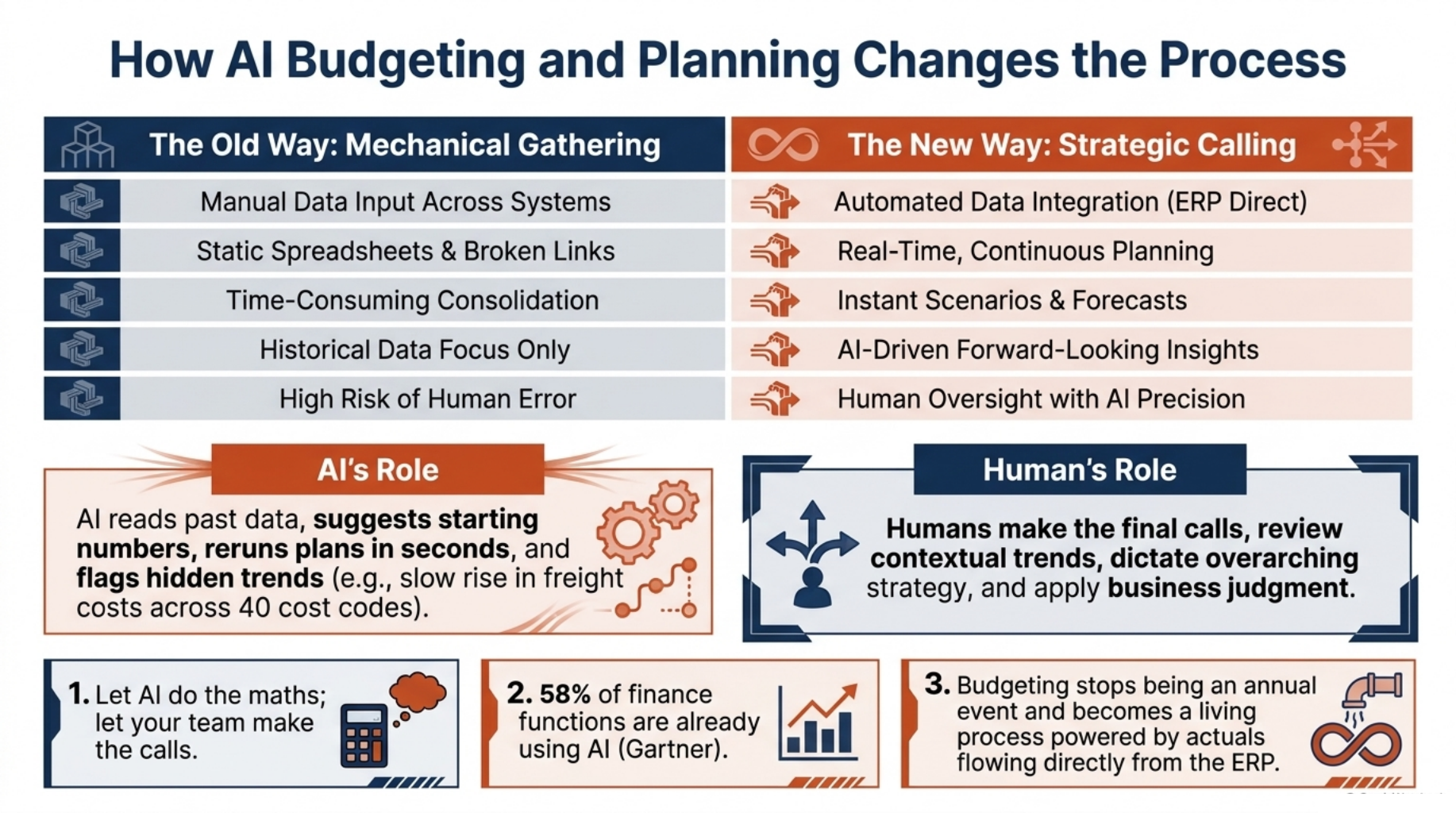
Let AI do the maths. Let your team make the calls.
AI takes over the slow, mechanical steps. It reads past data, suggests starting numbers, and reruns the plan in seconds when something changes. Your team still decides what the numbers should be.
Each month, actuals flow from your ERP into the plan, so nobody copies figures by hand. AI also flags trends a person might miss, such as a slow rise in freight costs spread across 40 cost codes. Finance teams are already moving this way: a Gartner survey found that 58% of finance functions were using AI.
The biggest change is in rhythm. Budgeting stops being an annual event and becomes a living process.
Rolling Forecasts That Update With Actuals
A rolling forecast always looks the same distance ahead, usually 12 to 18 months. Each time a month closes, you swap that month’s forecast for the real numbers and add a new month at the end. In June, you are planning through to next June, not staring at a December cliff edge.
Your effort goes into the months ahead, where decisions still matter.
Scenario Modelling in Minutes
Scenario modelling now takes minutes instead of days. Change one driver, such as sales volume or the exchange rate, and AI rolls the impact through revenue, margin, and cash. When the board asks what happens if the rand weakens by 15%, you can answer the same day.
To get there, you need a model built on drivers.
Build a Driver-Based Planning Model
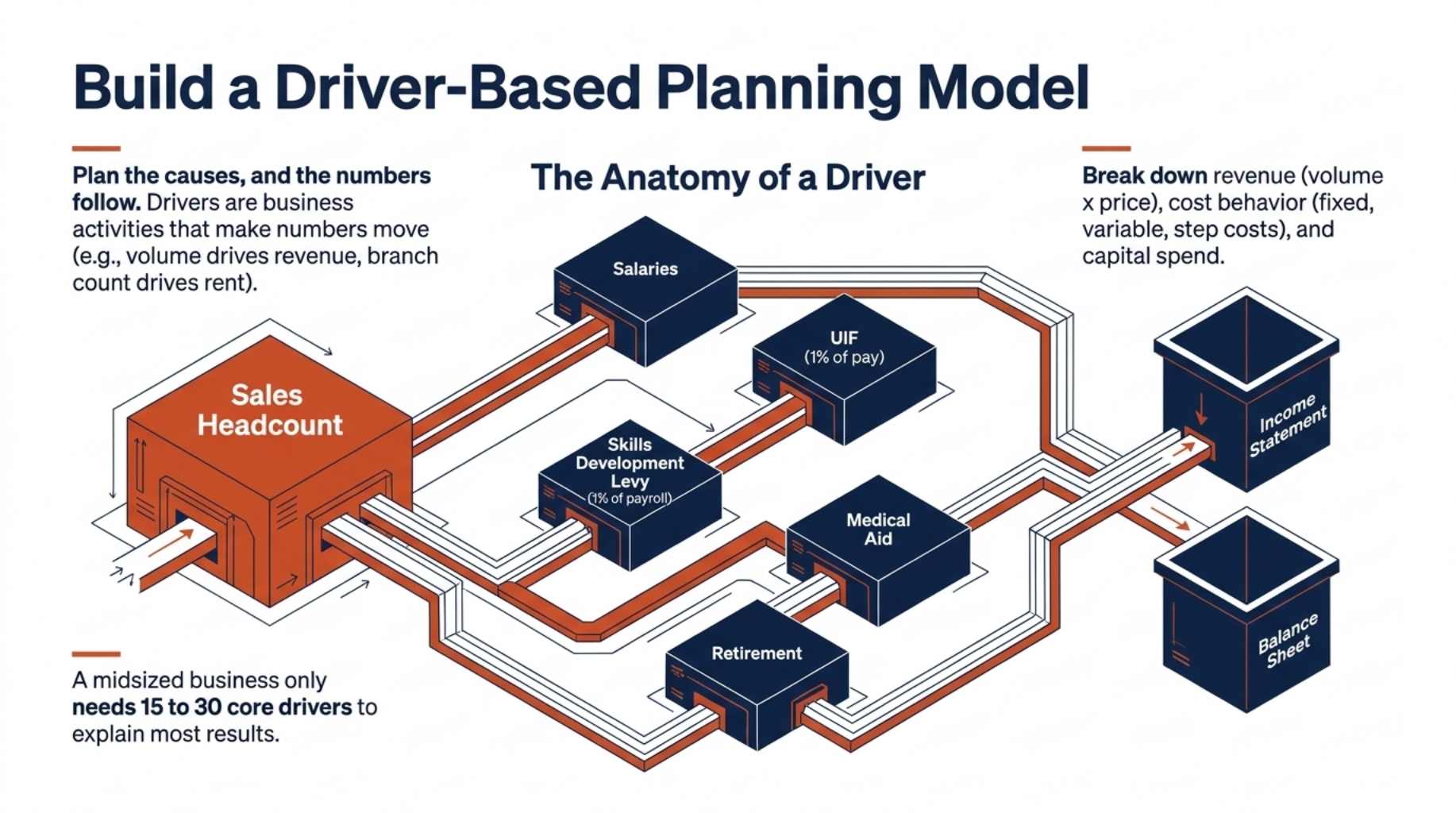
Plan the causes, and the numbers follow.
A driver is the business activity that makes a number move. Sales volume drives revenue, headcount drives salaries, and branch count drives rent.
Pick a small set of drivers that explain most of your results, often 15 to 30 for a midsized business. Link each one to the line items it affects. Then you review a short list of drivers instead of hundreds of line items.
Model Your Revenue Drivers
Start with volume times price, split by product, region, or channel. A Cape Town wholesaler might plan units per product group per province, each with its own average price.
If you sell subscriptions or services, add customer count, churn rate, and average order size.
Map Cost Behaviour and Headcount
Split costs by how they behave. Fixed costs, like rent, stay flat. Variable costs, like packaging, rise with volume, while step costs jump at set points, such as a new delivery truck for every 500 extra orders.
Plan headcount by role, start date, salary band, and annual increase. Then add UIF at 1% of pay, the Skills Development Levy at 1% of payroll, medical aid, and retirement contributions.
Plan Capital Spend
List every planned asset with its expected cost and purchase month. Link each one to depreciation in the income statement and to cash flow in the month you pay.
Let AI Suggest Your Baselines
Let AI suggest a baseline for each driver. It reads past trends and seasonal patterns, such as the Black Friday and festive season spike in retail, and proposes a starting number.
The driver owner accepts, adjusts, or rejects each suggestion and adds a note. Those notes become your audit trail.
Driver-Based Planning Template Outline
Use this template as a starting point for driver based budgeting for finance teams. Each row is one driver, and each driver feeds your financial statements.
| Driver | Owner | Source Data | Baseline (AI suggested) | Assumption Notes | Linked Line Items | Update Frequency |
|---|---|---|---|---|---|---|
| Units Sold | Sales Manager | Sales orders | 24 month trend plus seasonality | New Gauteng distributor from Q2 | Revenue, cost of sales | Monthly |
| Average Price | Commercial Lead | Invoice history | Six-month average | 6% price increase in March | Revenue | Quarterly |
| Sales Headcount | HR Manager | Payroll records | Current staff plus approved hires | Two hires in Q2 | Salaries, UIF, SDL | Monthly |
| Cost per Hire | HR Manager | Recruitment spend | 12-month average | Agency fee at 15% of salary | Recruitment costs | Quarterly |
| Electricity Cost per Month | Operations Manager | Utility bills | Usage trend times tariff | Municipal increase from July | Utilities | Monthly |
| Capex per Branch | CFO | Fixed asset register | Last branch fit out cost | One new branch in Q3 | Fixed assets, depreciation | Quarterly |
Revenue and cost drivers flow into the income statement, and headcount and capex also reach the balance sheet. Every row ends up in cash flow forecasting, the number your bank manager watches most.
With the model in place, you can start asking “what if”.
Using AI for Financial Scenario Planning: Best, Base, and Worst Cases
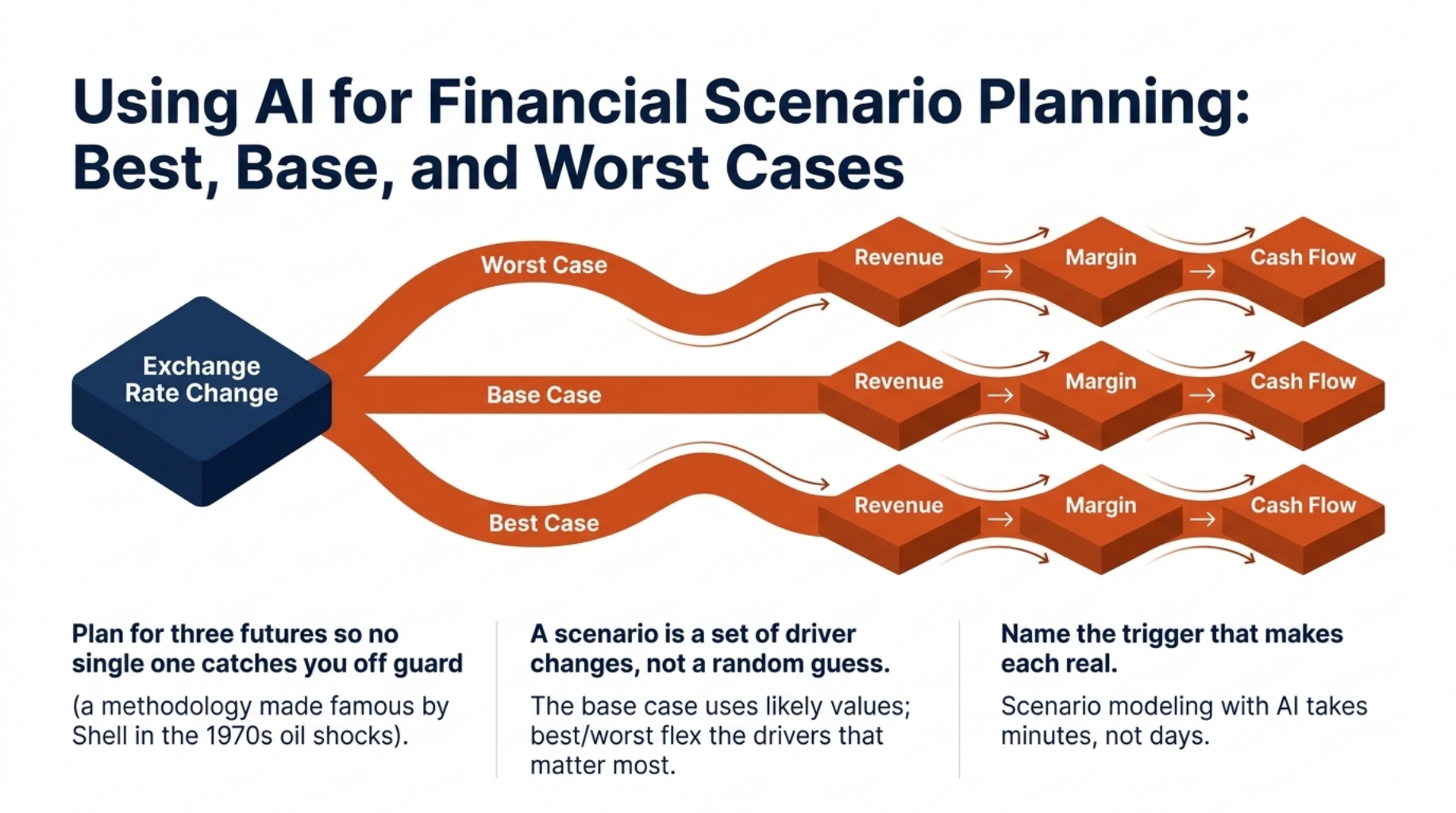
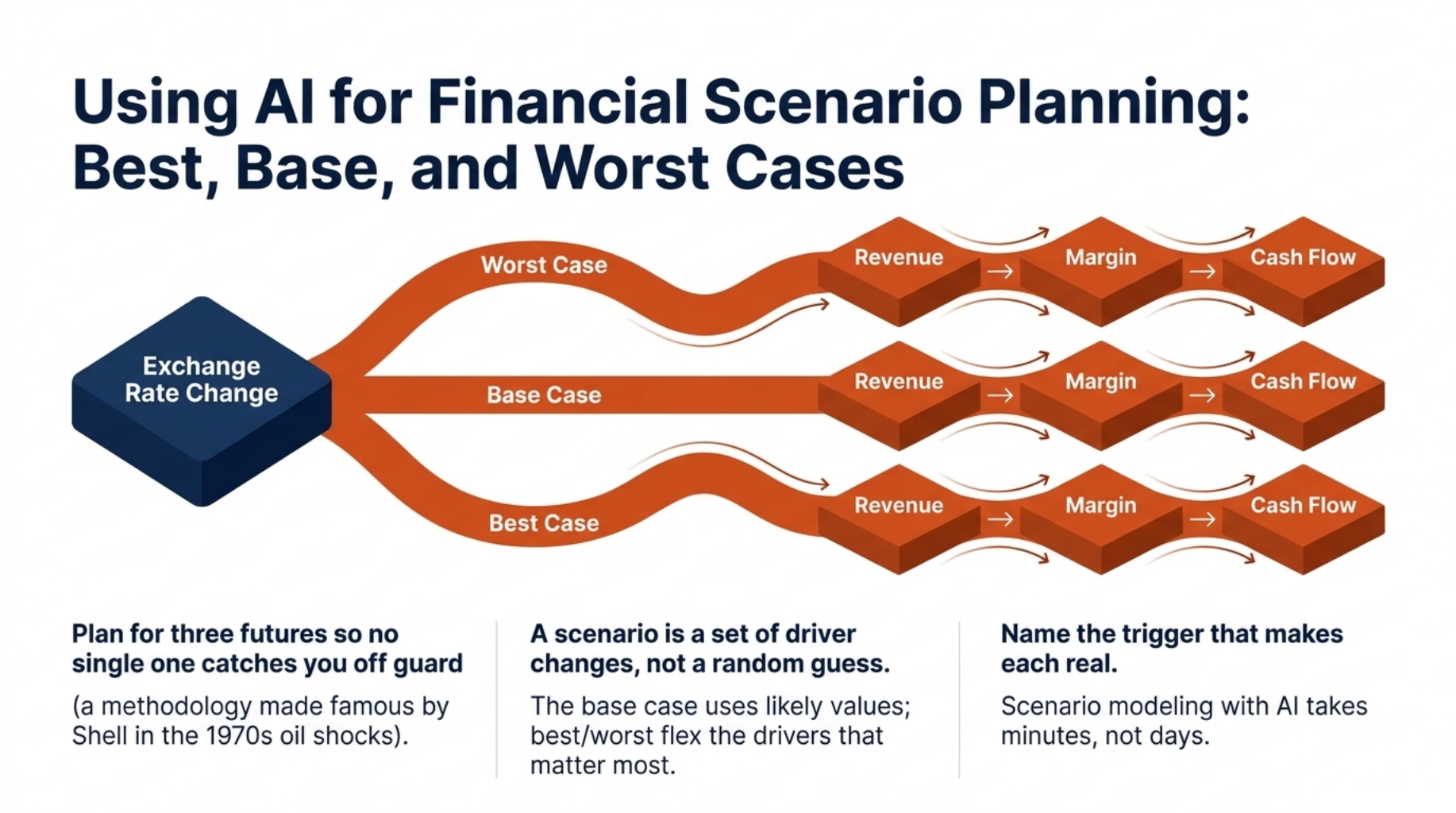
Plan for three futures so no single one catches you off guard.
A scenario is a set of driver changes, not a random guess. Shell made this approach famous when its planners helped the company prepare for the oil price shocks of the 1970s.
Three scenarios are enough for most teams. The base case uses your most likely driver values, while the best and worst cases flex the drivers that matter most. Each case should name the trigger that would make it real.
Example Scenario Model
Picture a Durban distributor that imports electronics priced in US dollars and sells them in rand.
| Driver | Worst Case | Base Case | Best Case |
|---|---|---|---|
| Sales Volume | Down 10% | Flat | Up 8% |
| Rand to Dollar Rate | 15% weaker | Steady | 5% stronger |
| Gross Margin | 22% | 28% | 31% |
| Headcount Growth | Hiring freeze | Two new hires | Four new hires |
| Capex Timing | Warehouse delayed a year | Warehouse in Q3 | Warehouse in Q2 |
| Revenue | R108m | R120m | R130m |
| EBITDA | R6m | R14m | R20m |
| Closing Cash | R2m | R11m | R17m |
| Action Plan | Pause capex, renegotiate supplier terms, hedge currency | Proceed as planned | Bring the warehouse forward, add stock |
The worst case is not a prediction. It is a plan. If the rand crosses your trigger point, the team already knows to pause the warehouse and hedge.
Scenarios only stay useful if the model underneath them stays current.
How to Build a Rolling Forecast With AI
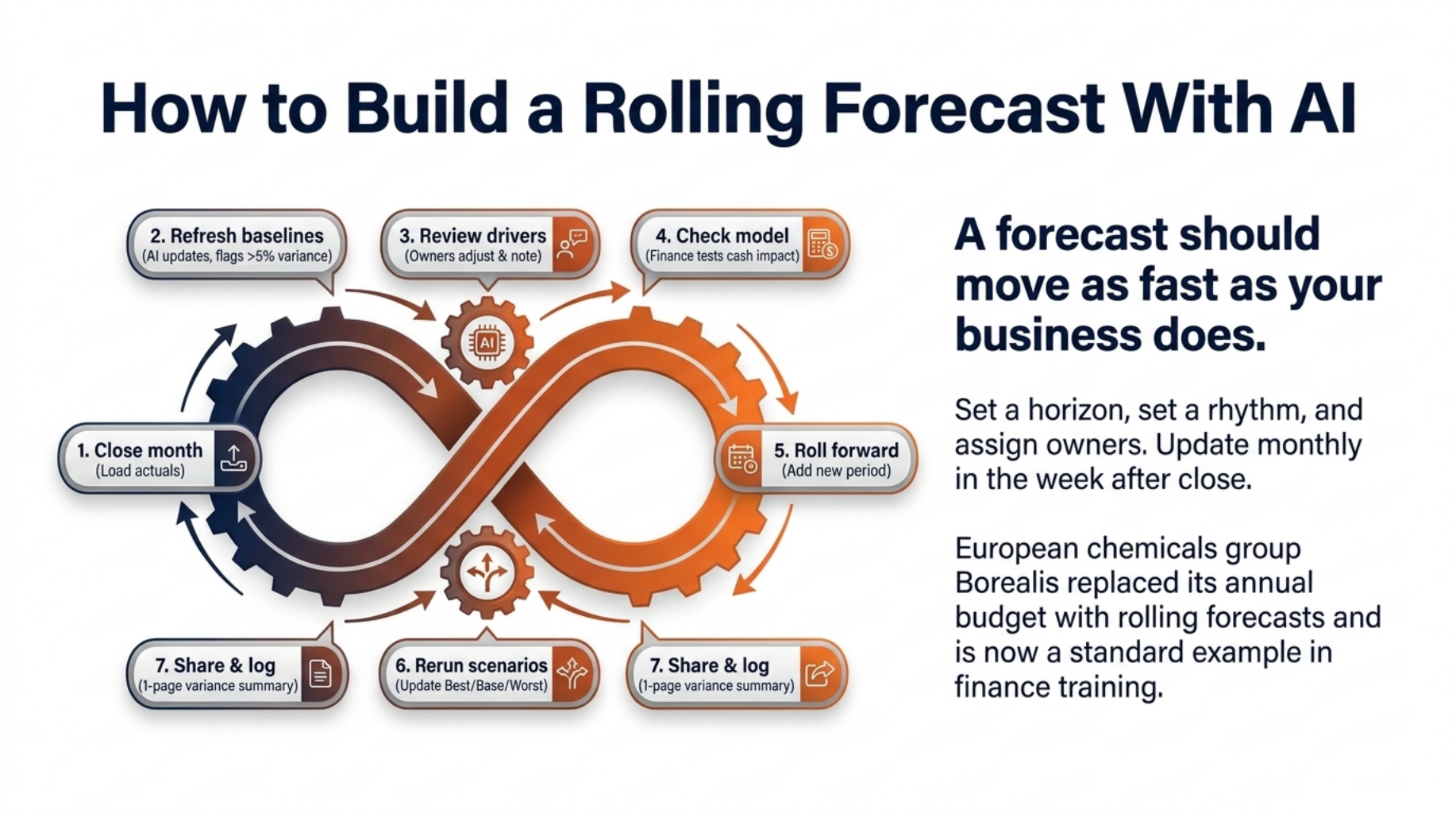
A forecast should move as fast as your business does.
To build a rolling forecast with AI, set a horizon, set a rhythm, and assign owners. Most teams pick 12 or 18 months and update monthly, in the week after month end close. Each driver gets one owner who keeps it current.
AI then refreshes baselines from the latest actuals and flags gaps that need a human look. The European chemicals group Borealis replaced its annual budget with rolling forecasts and is now a standard example in finance training.
Rolling Forecast Checklist
Run this routine every month:
- Close the month. Load final actuals into the planning model.
- Refresh baselines. Let AI update baselines and flag variances above your set limit, such as 5%.
- Review drivers. Owners check flagged drivers, adjust them, and add a note.
- Check the model. Finance tests the logic and the cash impact.
- Roll forward. Add one new period to the horizon.
- Rerun scenarios. Update the best, base, and worst cases.
- Share and log. Send leaders a one-page variance summary and record each decision.
This routine works best when everyone feeds the same model.
One Planning Model, Not Scattered Spreadsheets
Twenty spreadsheets give you twenty versions of the truth.
In many companies, sales, operations, and HR each keep their file, and finance stitches them together every month. Each handover is a fresh chance for error.
The risk is real. Raymond Panko at the University of Hawaii reviewed spreadsheet audits and found that close to nine in ten spreadsheets contained errors. At JPMorgan, a copy and paste error in a risk spreadsheet played a part in the “London Whale” trading losses of more than $6 billion.
One shared model fixes most of this. Departments enter their drivers in a controlled space, and finance sees every change and comment in one place. Software alone will not do it, though. You also need clear ownership and a set routine.
Give Each Department a Clear Role
Each driver gets one named owner and a due date every cycle. Approval steps sit on top, so a sales manager can update volumes, but the finance manager signs off before the change reaches the board pack. Every change carries a name, a date, and a reason.
Clear roles matter even more once AI starts providing suggestions.
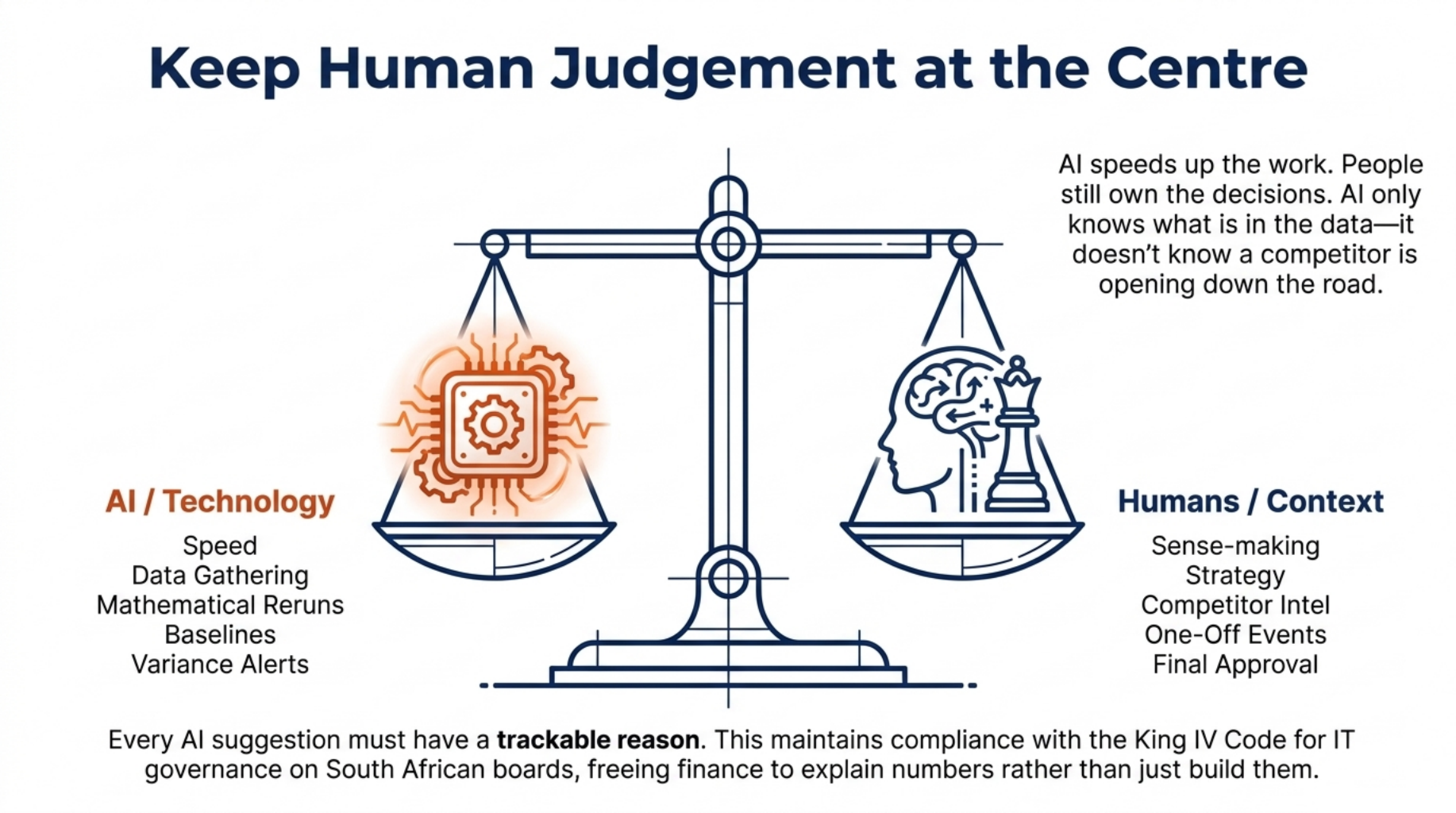
Keep Human Judgement at the Centre
AI speeds up the work. People still own the decisions.
AI is good at speed, and people are good at sense. Let AI handle data gathering, baselines, reruns, and alerts. People lead on strategy, one-off events, and final approval.
AI only knows what is in the data. It cannot know that a competitor is opening down the road, or that your largest client has hinted at leaving. Those insights come from conversations, not ledgers.
Every AI suggestion should come with a reason a person can check, such as “based on 24 months of seasonal sales”. This fits the King IV Code, which makes South African boards responsible for how technology and information are governed. It also frees finance to spend less time building numbers and more time explaining them.
So which system can hold all of this together?
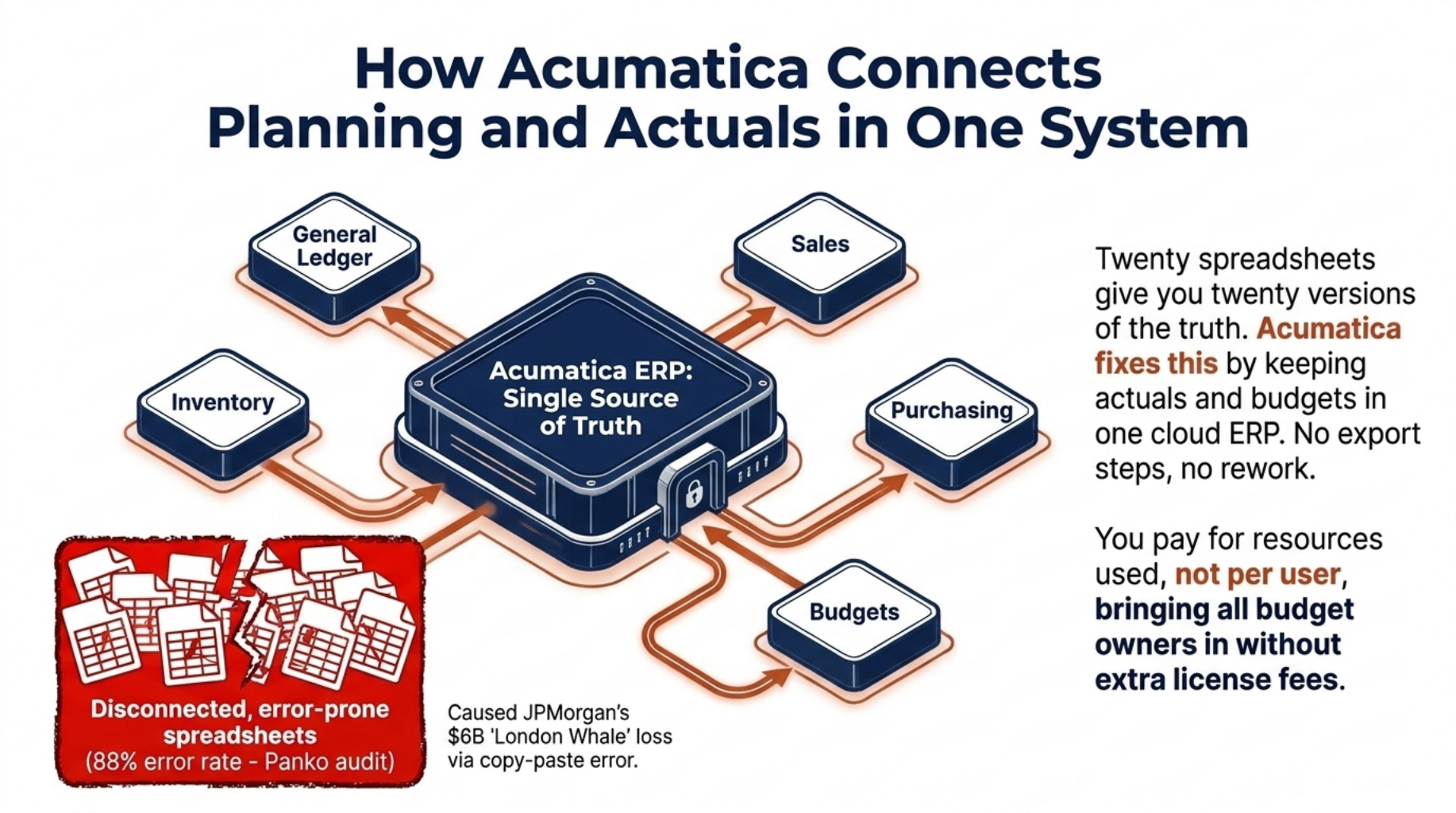
How Acumatica Connects Planning and Actuals in One System
Your plan and your actuals should live in the same place.
Acumatica keeps your general ledger, budgets, sales, purchasing, and inventory in one cloud ERP. Because actuals and budgets sit in the same system, there is no export step and no rework.
You can build budgets by account, branch, and department, then track them in actuals versus budget dashboards that update in real time. Role-based access means each manager sees only their numbers. Acumatica also uses machine learning to read supplier invoices and expense receipts, and its Marketplace offers add-ons for deeper financial planning and analysis.
Pricing helps too. Acumatica charges for the resources you use, not per user, so you can bring every budget owner into planning without paying extra licence fees.
Knowing what the system can do is one thing, but rolling it out well is another.
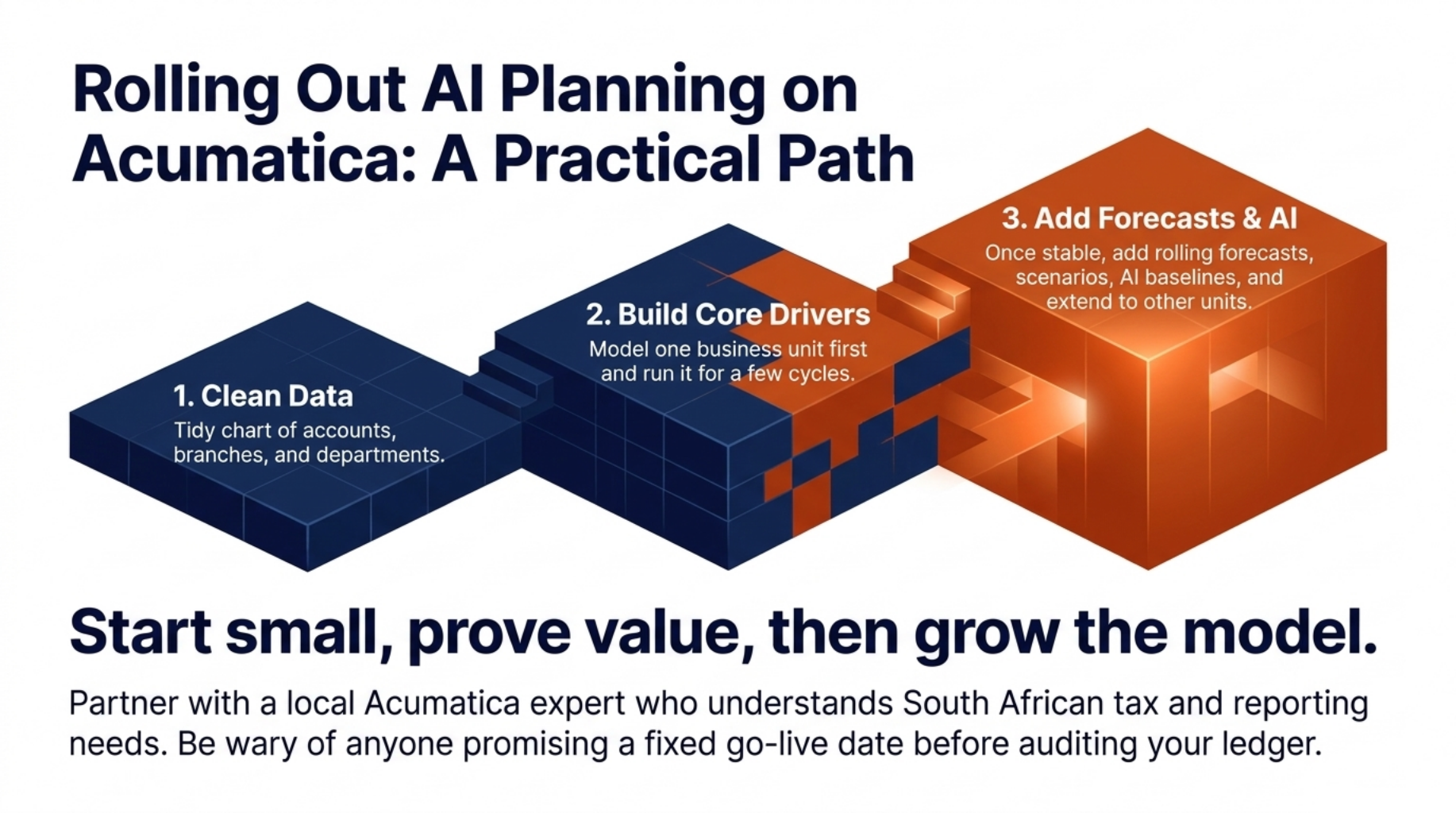
Rolling Out AI Planning on Acumatica: A Practical Path
Start small, prove value, then grow the model.
The safest rollout happens in three stages:
- Clean the data. Tidy your chart of accounts, branches, and departments.
- Build core drivers. Model one business unit first and run it for a few cycles.
- Add forecasts and AI. Once the base is stable, add rolling forecasts, scenarios, and AI baselines, then extend to other units.
A local Acumatica partner makes a big difference here. They know South African tax and reporting needs, and they can train your team. Be wary of anyone who promises a fixed go live date before seeing your ledger because timing depends on your data and your people.
Wrapping Up
AI budgeting and planning replaces a stale yearly budget with a plan that updates every month. Driver-based models, three clear scenarios, and a set checklist make the process fast and repeatable. AI handles the mechanical work, while your team keeps control of the decisions.
Start with one business unit, a handful of drivers, and a monthly routine, then grow from there.
Ready to see it in action? Book an Acumatica demo to see rolling forecasts and budget versus actual reporting with your data.
FAQ
What is AI budgeting and planning?
AI budgeting and planning uses machine learning to analyse past data, suggest baselines, and update forecasts as actual results come in.
How is a rolling forecast different from an annual budget?
A rolling forecast keeps a set time horizon, such as 12 months, and moves forward each period, while an annual budget stays fixed for the year.
What is driver-based planning?
Driver-based planning builds the budget from business activities like sales volume, price, and headcount instead of setting each line item by hand.
How many scenarios should a finance team model?
Most finance teams need three scenarios, the best case, a base case, and the worst case, to plan for risk without getting lost in detail.
Can AI replace the finance team in budgeting?
No, AI speeds up data work and analysis, but people still set strategy, judge one-off events, and approve the final plan.